





v2027 takes the Multi-Physics, Multi-Scale, Machine-Learning Augmented, Agentic GT System Simulation Platform to the next level

GT-SUITE v2027 Highlights
Smarter tools for faster engineering decisions
-
AI.modeler multi-agent workflow
Three AI tools build the model, run the DOE and write the report in one conversation. New physics-informed metamodels (PINNs) keep predictions physical when data is sparse.
-
Engine models to real-time in ~8 hours
One template converts a detailed engine performance model into a calibrated GT-POWER-xRT model ready for XiL deployment in about a day.
-
GT-Project and Git 3-way merge
One project file organizes all of a program’s files, with project libraries and an in-tool Git merge (beta).
-
Thermal fluids across the full development cycle
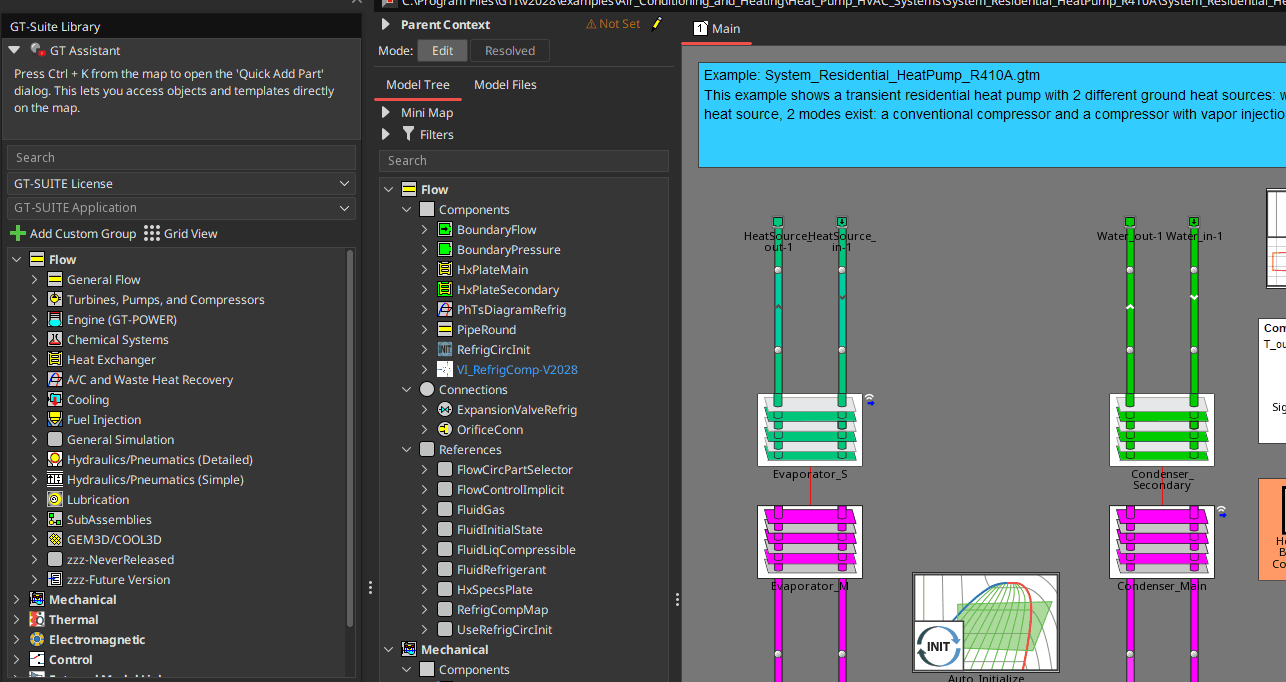
Size a refrigeration system or compare heat exchangers in minutes. Refrigerant blends with composition drift and conjugate heat transfer in Auto-3DFlow add detailed physics when you need it.
-
Deeper physics for e-mobility and powertrain
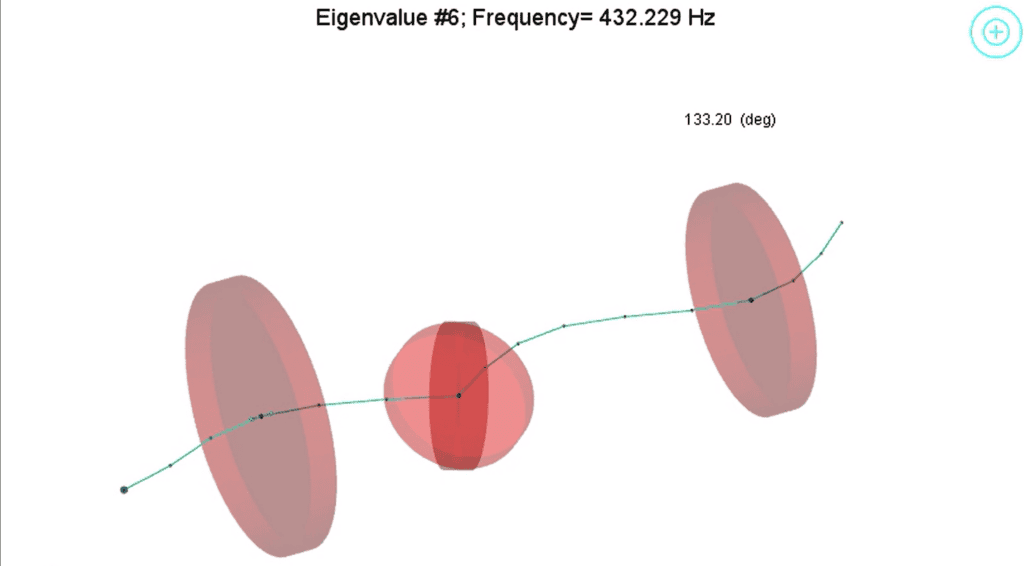
Motor NVH in GT-FEMAG, a 2D ring blowby model, and frequency-domain rotordynamics.
GT-SUITE | AI and Machine Learning
AI.advisor Image Support
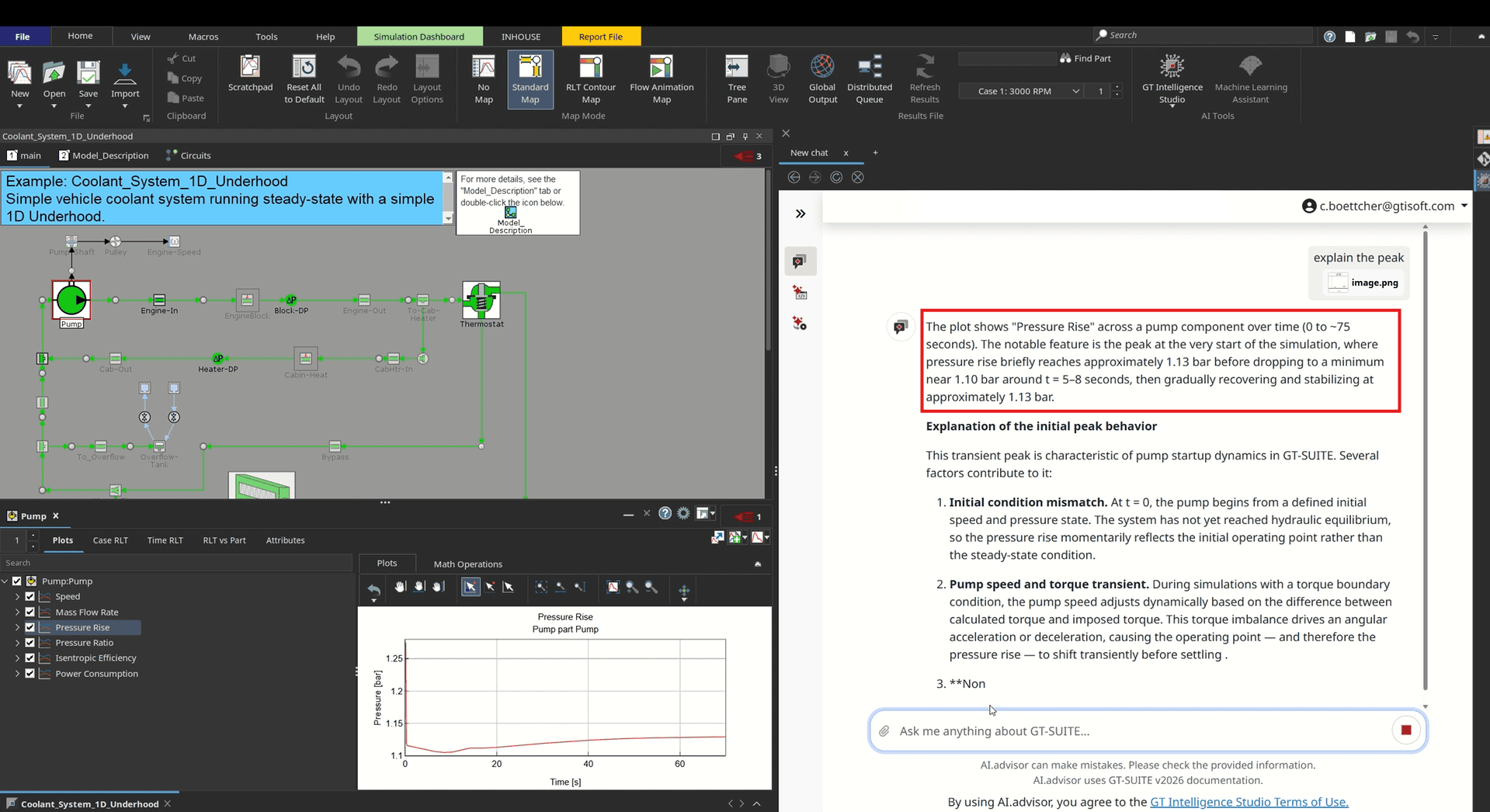
Simulation engineers troubleshoot with screenshots: a plot that looks wrong, a supplier datasheet, an error dialog. Retyping each one as text before asking for help slows the work.
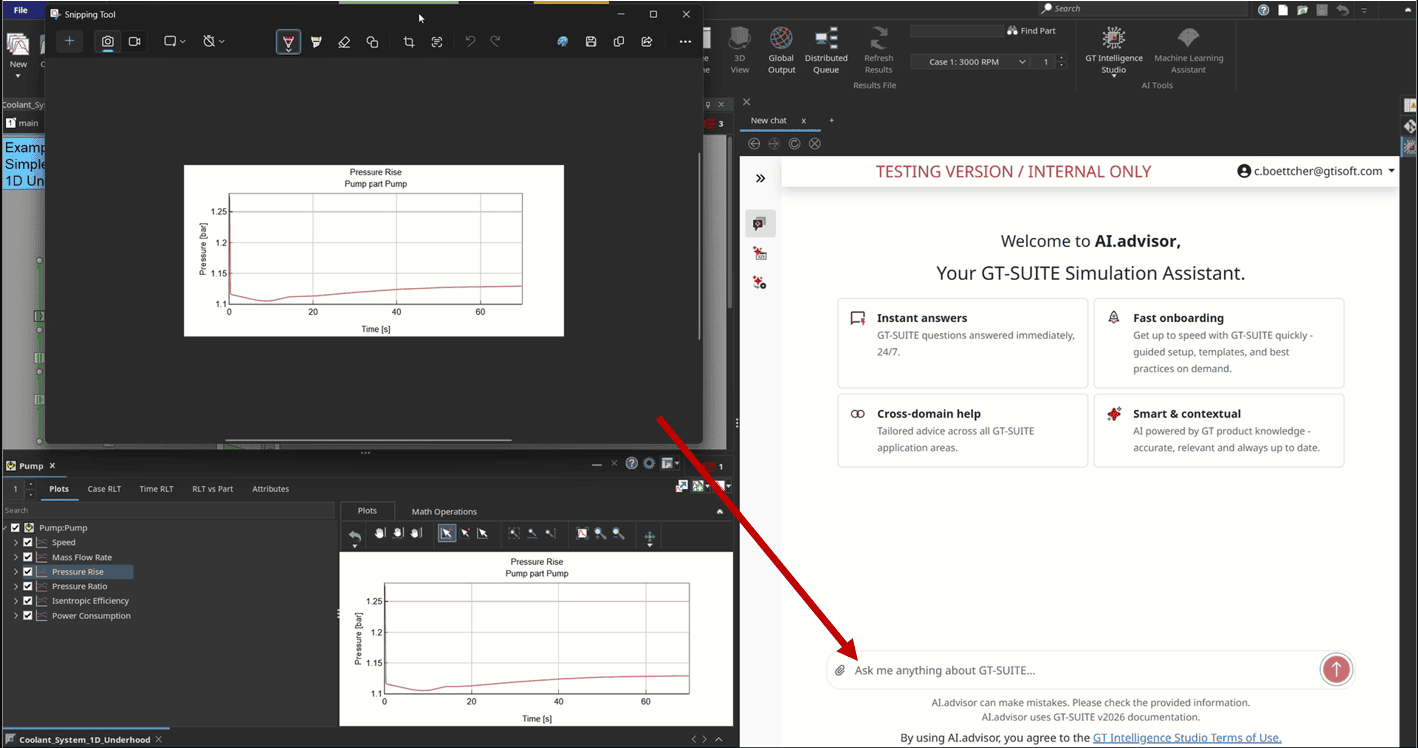
GT-SUITE v2027 adds image support to AI.advisor, the assistant within GT Intelligence Studio, GT’s generative AI product family, trained specifically on GT-SUITE expertise. Engineers paste or drop any screenshot directly into the conversation, and AI.advisor reads the image alongside the question. This supports four common workflows:
- Explain results: Ask what a plot or data table means and get the answer in plain language.
- Model from a spec sheet: Paste a supplier datasheet and ask how to model the component in GT-SUITE.
- Resolve modeling issues: Share a screenshot of the model map, and AI.advisor pinpoints the setup problem.
- Decode error messages: Send the error shown on screen and get the cause and the fix.
GT-SUITE | AI AND MACHINE LEARNING
Enterprise Continuity & Sharing in GT-Intelligence Studio
Long engineering jobs lose context when sessions end, and teams lose time when each engineer rebuilds the same workflows, agents, and knowledge alone.
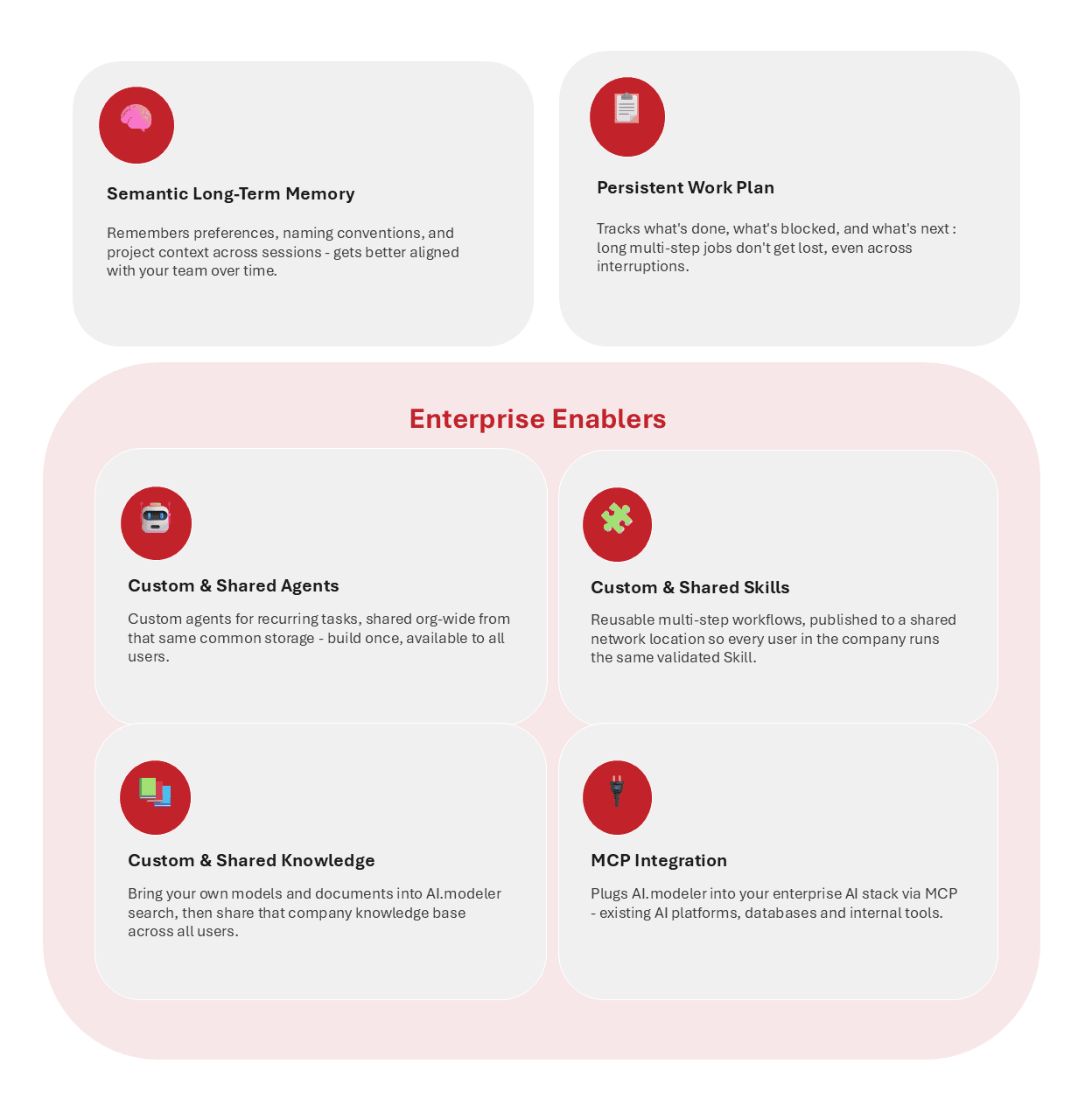
GT-SUITE v2027 extends AI.modeler, the multi-agent framework in GT Intelligence Studio, so it keeps context between sessions and shares validated work across the organization. Two capabilities support continuity:
- Semantic long-term memory: Retains preferences, naming conventions, and project context across sessions, so AI.modeler aligns more closely with a team over time.
- Persistent work plan: Tracks what is done, blocked, and next, so long multi-step jobs survive interruptions.
Four enterprise enablers let teams build once and share with every user:
- Custom and shared skills: Publishes reusable multi-step workflows to a shared network location, so every user in the organization runs the same validated skill.
- Custom and shared agents: Creates agents for recurring tasks and shares them organization-wide from the same common storage.
- Custom and shared knowledge: Adds your own models and documents to AI.modeler search, then shares that knowledge base across all users.
- Model Context Protocol (MCP) integration: Connects AI.modeler to existing enterprise AI platforms, databases, and internal tools.
Skills and custom agents solve different problems. A skill is a workflow file that the host agent runs inside its own shared context window, which suits repeatable tasks. A custom agent has its own identity and a fresh context window, which suits tasks that need specialist judgment. That fresh context gives engineers an independent second opinion: the agent re-queries the model to check for errors, works with specialist tools, returns findings in a consistent evidence format, accepts corrections, and runs when the level of risk calls for it.
GT-SUITE | AI AND MACHINE LEARNING
Reusable Modeling Workflows with Skills
Multi-step GT-SUITE modeling tasks, such as building a calibration model or auditing a lubrication circuit, force engineers to repeat the same setup by hand and risk inconsistent results from one user to the next.
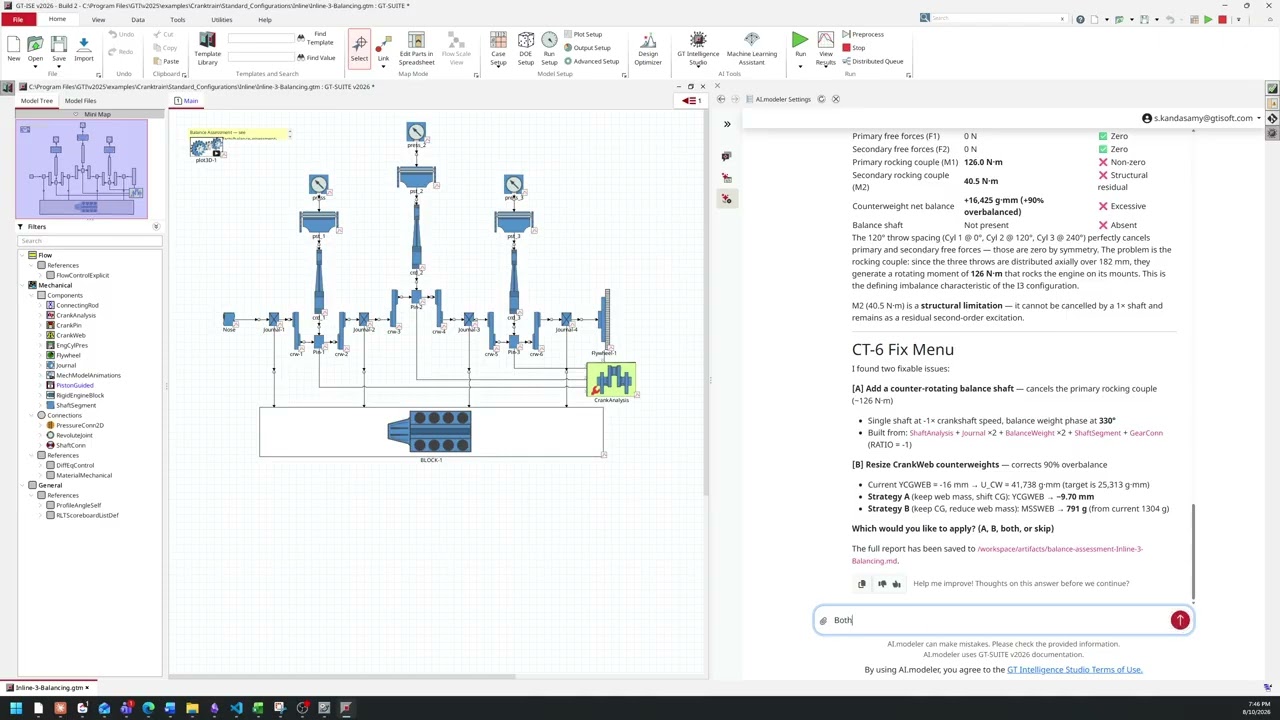
AI.modeler, the multi-agent assistant in GT Intelligence Studio, now includes Skills: saved, step-by-step workflows that it activates on demand. A single instruction replaces a manual walkthrough, so every run follows the same expert-guided process. GT-SUITE ships with 24 Skills in three groups:
- Productivity (10 Skills): Automate setup work, such as building a full heat exchanger calibration model from specifications or assembling a refrigerant compressor model from a single object, so engineers spend less time on setup and more on simulation.
- Quality (9 Skills): Audit models before they run, checking plot and results storage, hidden attributes, EngineMap inputs, and lubrication circuits to catch missing data and silent errors early.
- Innovation (5 Skills): Explore more design concepts faster, including cam phasing, injection timing, GT-AutoLion peak power capability, and frequency-domain cranktrain damping for Noise, Vibration, and Harshness (NVH) analysis.
Organizations can also publish custom Skills to a shared network location, so every user in the organization runs the same validated workflow.
This capability has also been made available in GT v2026.2.01
AI.Modeler New Skills
GT-SUITE | AI AND MACHINE LEARNING
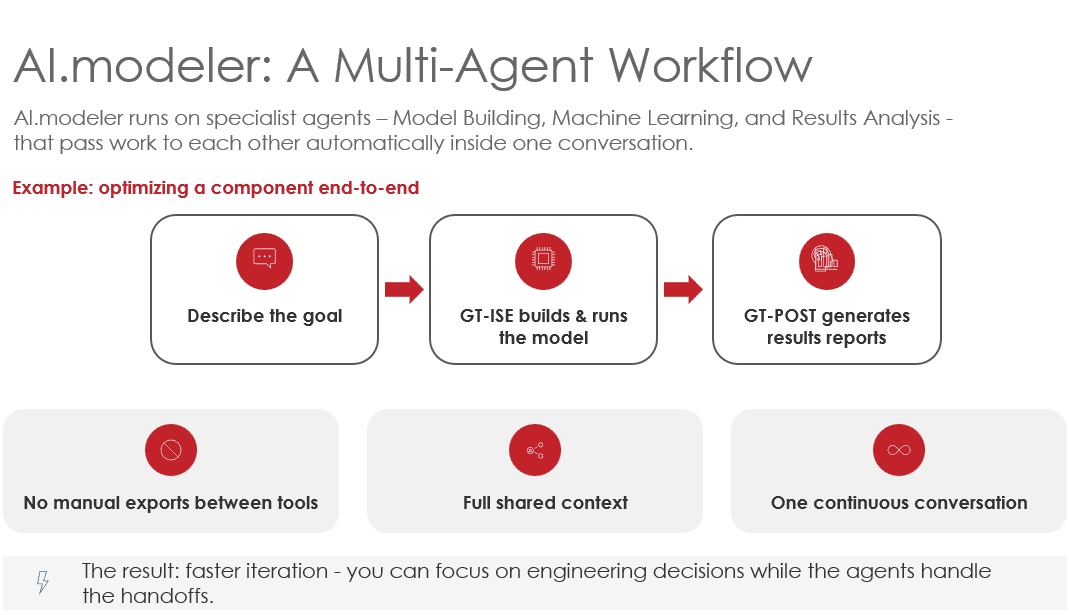
Multi-agent workflow
Optimizing a component in simulation typically means moving between model building, design sweeps, metamodel fitting, and results review, with data re-exported and context re-explained at every handoff.
GT Intelligence Studio’s AI.modeler removes those handoffs with three specialist agents that pass work to each other automatically inside one continuous conversation. Engineers describe the goal in plain language, the agents share full context, and no manual exports move between tools. In a typical optimization, GT-ISE builds and runs the model, GT-POST generates results reports, and the engineer stays focused on engineering decisions.
The three AI.modeler agents are:
- Model Building: Sets component attributes, places the right GT-SUITE parts, wires connections, and launches the simulation from a plain-language description of the system.
- Machine Learning: Creates, combines, and reduces datasets from simulation results, then fits surrogate models and grid-searches algorithms to find the best fit. It runs the full chain of Design of Experiments (DOE) sweep, results, metamodel, and fast predictions in one conversation.
- Results Analysis: Reads result files directly from GT-POST, compares cases across runs, sweeps, and design variants, writes summary reports, and exports plots and tables in the formats teams already use.
GT-SUITE | AI AND MACHINE LEARNING
Metamodel Fine-Tuning For Faster Training
Retraining a metamodel from scratch whenever the underlying data changes consumes time that engineering teams rarely have to spare.
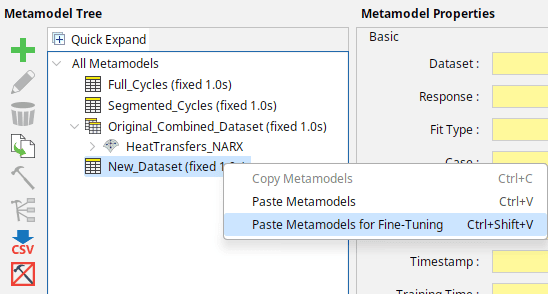
In GT-SUITE v2027, the Machine Learning Assistant now supports metamodel fine-tuning, which adapts a metamodel trained on an original dataset to a new, different dataset. When repeating a project on a new dataset with the Heating, Ventilation, and Air Conditioning (HVAC) refrigerant circuit example model, fine-tuning trained 2–3× faster than training from scratch. Engineers can reproduce this result with the HVAC_Refrigerant_Circuit example under Examples > 0_AI_Machine_Learning. Fine-tuning benefits three scenarios:
- Augmented datasets: When new data extends an existing dataset, engineers fine-tune the existing metamodel to the larger dataset instead of retraining it.
- Repeated projects: When a completed machine learning project must be repeated on a new dataset, engineers start from the existing metamodel rather than from scratch.
- Foundational models: Engineers can train a metamodel on a large, comprehensive dataset, then fine-tune it to a smaller dataset that covers a subset of the factor space. v2027 does not ship any foundational models, so users build this workflow themselves.
Fine-tuning also enables a related capability: evaluating a metamodel on a dataset different from the one it was trained on. Previously, engineers had to retrain the metamodel on the new dataset. Now they can copy and paste the existing metamodel onto the new dataset and evaluate it immediately, provided the new dataset uses the same input factors and responses as the original.
GT-SUITE | AI AND MACHINE LEARNING
Expanded Metamodel Export Options
Metamodels deliver the most value when engineers can move them out of the simulation environment and into the tools where they are deployed, from machine learning pipelines to real-time test benches.
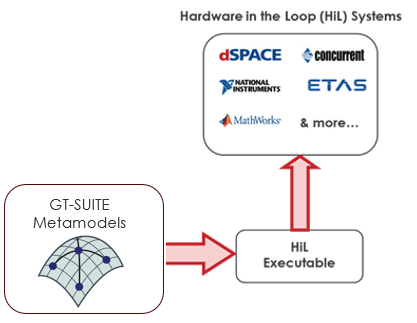
GT-SUITE v2027 adds two new export paths for metamodels. Engineers can now export a metamodel to ONNX (Open Neural Network Exchange), an open-source format that integrates easily with a large number of deployment frameworks. Engineers can also export metamodels as Functional Mock-up Units (FMUs) that contain pure C code instead of precompiled .dll or .so files. These C code FMUs are particularly convenient for integration with Hardware-in-the-Loop (HiL) systems, rapid control prototyping (RCP) systems, and low-power boards. Example deployments include Typhoon HIL, dSPACE, and bare-metal boards.
Together, the two options give teams more flexibility in sharing and using GT-SUITE metamodels across different environments.

GT-SUITE | AI AND MACHINE LEARNING
Physics-Informed Neural Networks
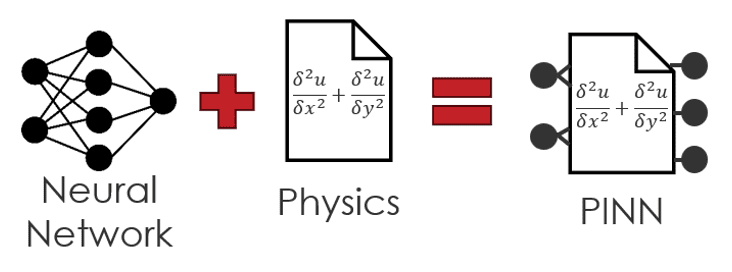
Metamodels trained purely on data can predict behavior that violates physical laws, particularly when training data is sparse.
GT-SUITE v2027 introduces a new static regression metamodel type for physics-informed neural networks (PINNs). Engineers can apply custom governing equations and constraint equations that force the neural network to obey physical behavior, which strengthens existing static regression metamodels where data alone falls short. The PINN metamodel also supports multiple responses, so it can serve wherever a multi-response multilayer perceptron (MLP) is needed.
Engineers define the equations directly in an equation editor on the Create Metamodels page of the Machine Learning Assistant. The editor ties each set of equations to its metamodel.
GT-SUITE | THERMAL FLUIDS
Refrigerant Mixtures with Composition Drift
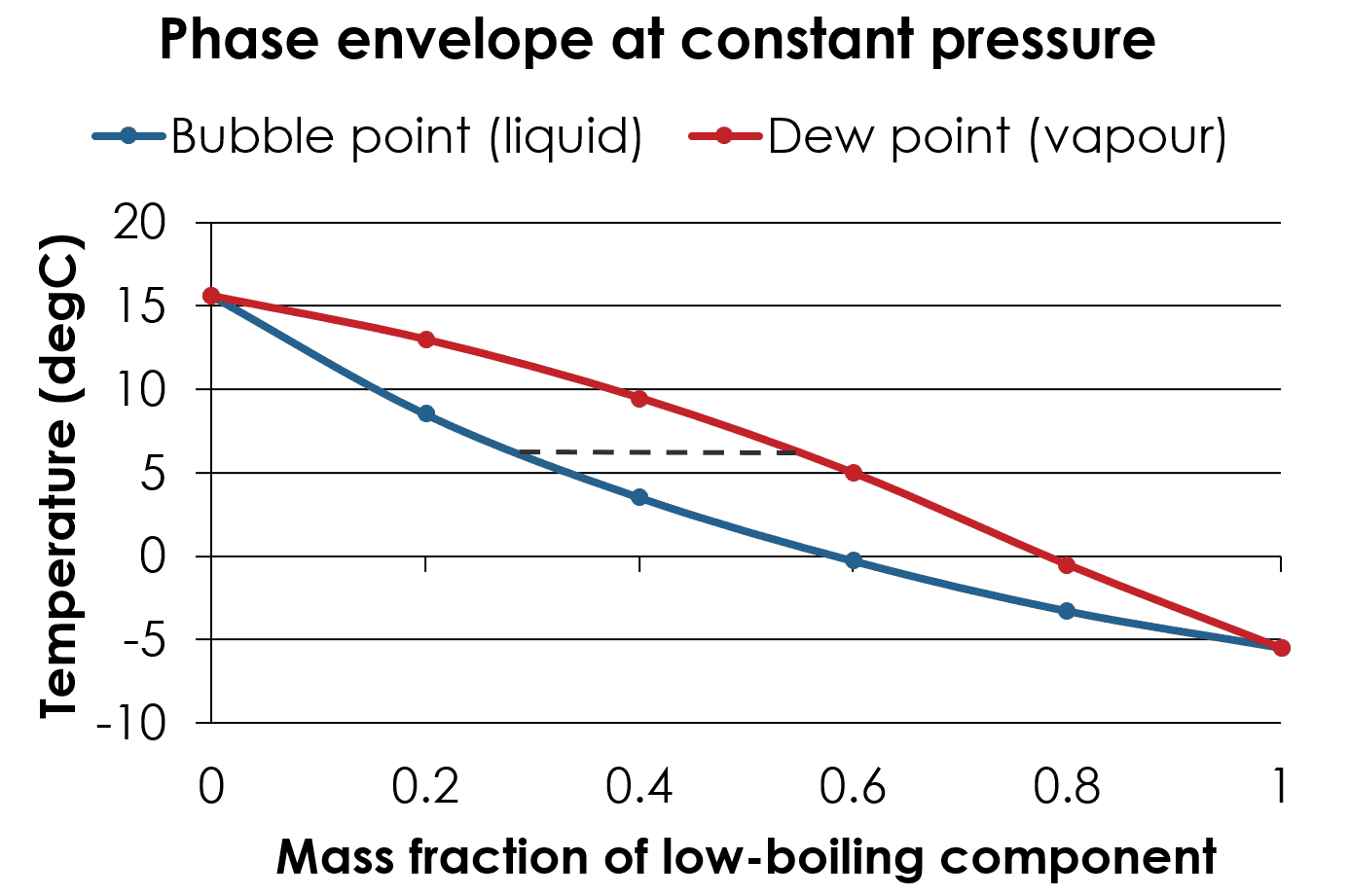
As regulations restrict established refrigerants, engineers are increasingly investigating refrigerant mixtures. In zeotropic blends, components evaporate at very different temperatures which change the fluid’s composition as it boils.
That composition shift can affect safety, due to flammability, as well as system performance. Auto-cascade cycles in cryogenic systems exploit it to reach lower temperatures, while other designs must account for the resulting temperature drift.
GT-SUITE v2027 contains improved fluid property models for zeotropic blends that accurately capture system composition shift driven by liquid holdup in components like receiver-driers or accumulators. The solution continues to heavily rely on REFPROP for the properties. The property calculations are accurate and fast as a result of internally developed methods that leverage neural networks. This results in property calculations that are 60x faster on average than direct calls to REFPROP.
GT-SUITE | THERMAL FLUIDS
Early-stage Vapor Compression System Sizing
Heat pump and refrigerant system development typically begins before engineers have selected components, yet system models have traditionally required test data and concrete component data before those models would be built.
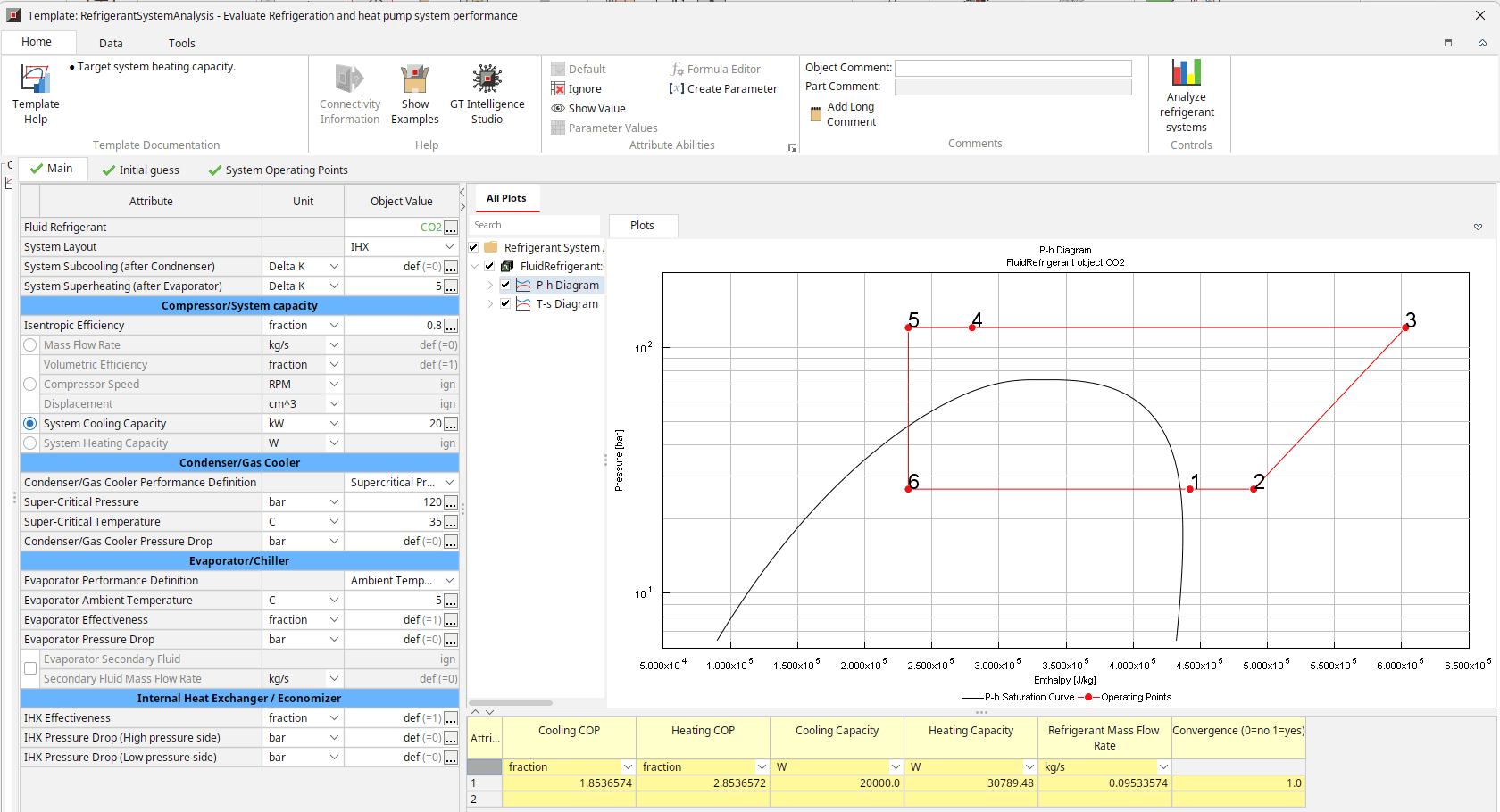
GT-SUITE v2027 delivers a dedicated tool for preliminary refrigeration system analysis early in the design cycle. It requires only a handful of inputs, and engineers choose which to provide. For example, inputs could include basic compressor characteristics, a target cooling rate, and boundary conditions. The tool immediately returns the required refrigerant flow rate, capacity, and coefficient of performance (COP). Instead of building a full transient circuit model, engineers can set up a model and obtain results in less than a minute. It supports any refrigerant, so teams can evaluate natural refrigerant alternatives such as CO2 before committing to detailed component and system modeling.
The tool also easily integrates with the native Design of Experiments (DOE) and optimization features to find ideal designs and operating points.
GT-SUITE | THERMAL FLUIDS
Heat Exchanger Comparison Tool
Selecting a heat exchanger is a common task for thermal engineers, and evaluating each candidate’s thermal and hydraulic loss performance has traditionally meant building a GT-SUITE model.
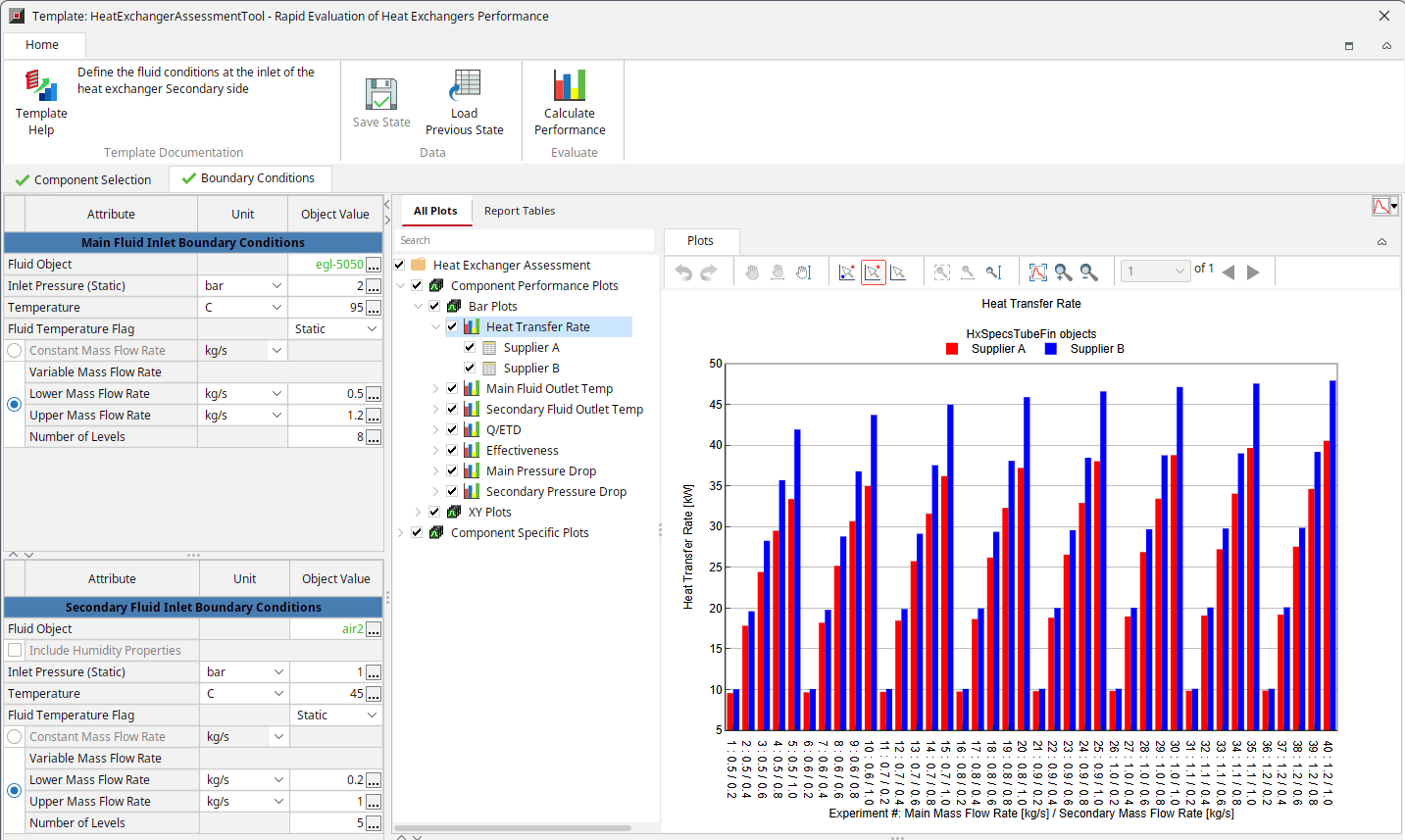
The new heat exchanger assessment tool in v2027 evaluates performance all in a single dialog without needing to build a model. The tool supports all heat exchanger types available in GT-SUITE. Engineers specify the heat exchangers to compare, define the boundary conditions for the comparison, and view the results.
Engineers can quickly assess components, geometry, and scaling, such as changing fin pitch or tube length, and vary flow rates and fluid types. A wide range of results are available, including heat transfer rate and pressure loss for each component.
Novice users who once spent an hour or more building a model can now complete a comparison in minutes. By reducing the time spent building models and preparing reports, the tool lets engineers set boundary conditions quickly and identify the best-performing component by comparing results side by side.
GT-Auto-3DFlow | THERMAL FLUIDS
Conjugate Heat Transfer in GT-Auto-3DFlow
High fidelity thermal component modeling depends on accurately capturing heat transfer between fluids and solids, a coupled problem known as conjugate heat transfer (CHT).
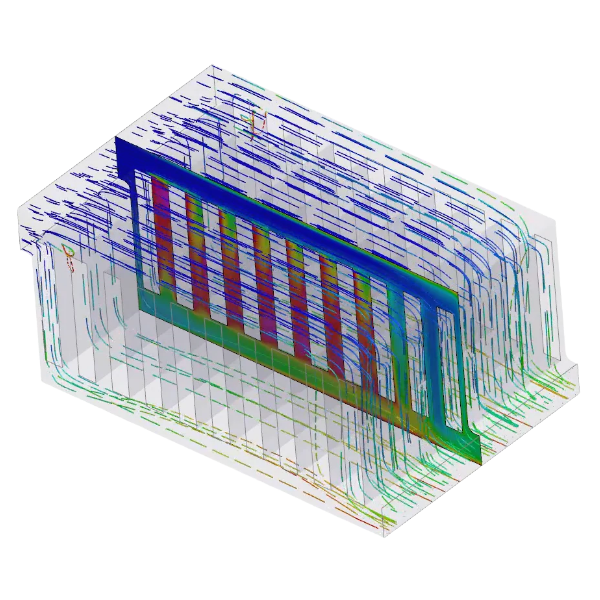
GT-SUITE v2027 adds CHT to GT-Auto-3DFlow, GT’s automated 3D flow solver designed for engineers without 3D CFD experience. The solver computes the flow in 3D and couples it to GT’s native 3D thermal finite element (FE) solver, which calculates temperatures in the solid structures. GT-Auto-3DFlow meshes the 3D flow domain and integrates the thermal domain automatically, so the entire process runs in a single workflow. The result is a solution that is fast, accurate, and easy to use.
This capability extends the existing strengths of GT-Auto-3DFlow, which link 3D airflow to GT’s 2D heat exchangers and provide general-purpose 3D flow for characterizing pressure drop and heat transfer in complex geometries. Typical use cases include cooling of battery packs, e-motors, engines, power electronics, data centers, and more.
GT-AutoLion | BATTERY
Li-Sulfur Battery
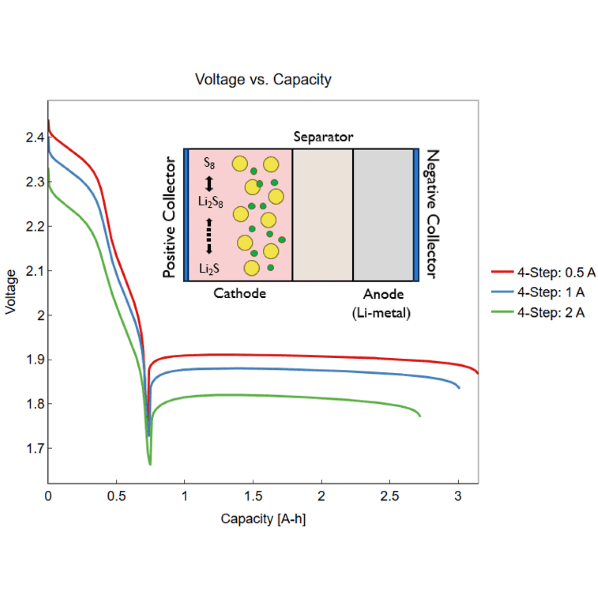
Lithium-sulfur (Li-S) chemistry offers a path to significantly higher specific energy than conventional lithium-ion cells, but the multiple, interdependent sulfur reduction reactions that occur during cycling have made accurate simulation of this chemistry difficult to achieve.
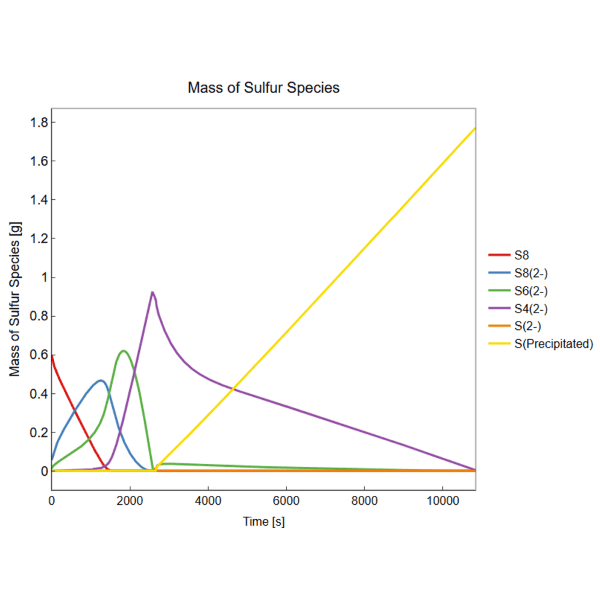
GT-SUITE v2027 extends GT-AutoLion, GT’s electrochemical-thermal battery simulation software for cell-level analysis, with the new AutoLionSulfur template, bringing Li-S chemistry into the GT-AutoLion product family for the first time. The template captures key Li-S mechanisms, including the polysulfide shuttle effect, sulfur species transport, and lithium sulfide (Li₂S) formation. It also models diffusion between active and inactive sulfur reservoirs and dynamically updates internal resistance as sulfur conversion reactions progress, providing a more realistic representation of battery behavior.
By combining essential Li-S physics with a computationally efficient 0D formulation, AutoLionSulfur enables practical Li-S battery simulation for engineering workflows and seamless integration into larger pack- and system-level studies.
AutoLionSulfur supports:
- Configurable reaction fidelity with up to five sulfur reduction pathways
- Polysulfide shuttle modeling for accurate charging behavior
- Tracking of sulfur species evolution and Li₂S formation
- Dynamic internal resistance based on ongoing sulfur conversion reactions
GT-AutoLion | BATTERY
Multiscale Electrochemical-Mechanical Coupling
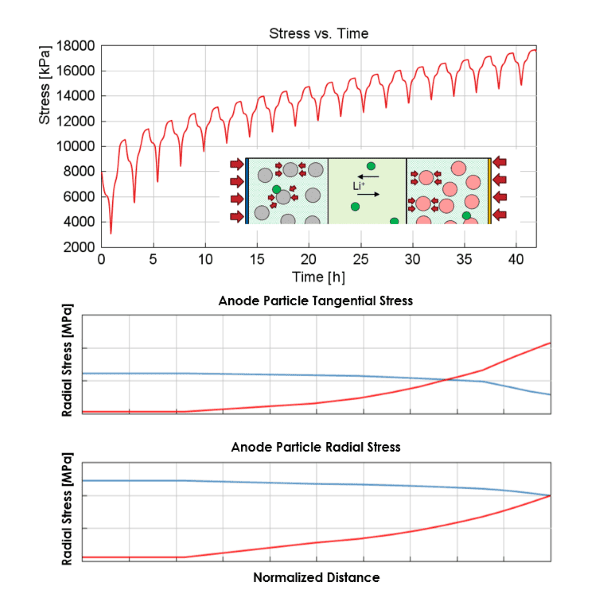
Battery performance and aging depend heavily on mechanical effects inside the cell, swelling, internal stress, and gas generation from parasitic reactions, but these effects are difficult to model together with the underlying electrochemistry, and existing tools often treat them in isolation.
GT-AutoLion v2027 extends its electrochemical-mechanical coupling in two directions. First, the model now captures internal gas generation from side reactions that occur during cycling, including the resulting pressure buildup and its effect on cell volume and ion transport kinetics. Second, particle-level mechanics, the radial and tangential stresses that build up in active material particles as lithium ions intercalate and de-intercalate, are now mechanically constrained by neighboring particles and by boundary conditions at the electrode and cell level, rather than treated independently.
Together, these developments let engineers model mechanical behavior consistently across the particle, electrode, and cell scales, giving a more complete and physically consistent picture of how mechanical effects drive performance and degradation over a battery’s life.
GT-AutoLion | BATTERY
Bipolar Stacking Configuration Analysis in GT-AutoLion-3D
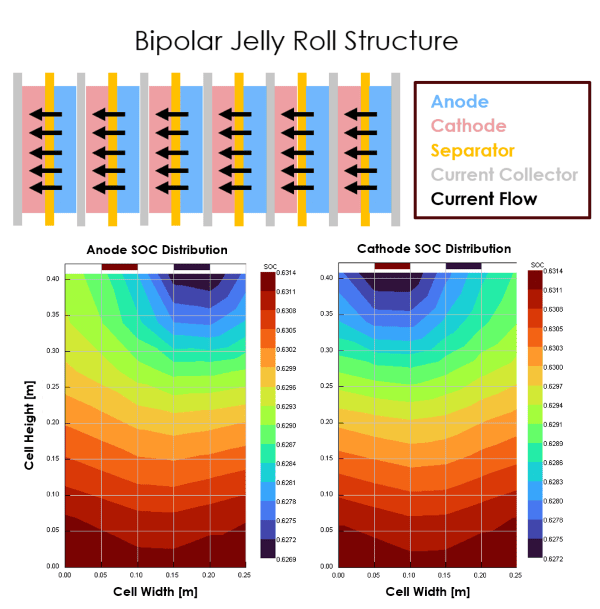
Stacked battery topologies have traditionally relied on a monopolar configuration, where current collectors on both sides of each electrode have the same polarity. A bipolar structure, where the current collector differs on each side, simplifies the current path and increases cell voltage for higher power output. In conventional lithium-ion batteries, manufacturing a reliable bipolar design has been difficult due to electrolyte leakage risk, but the architecture is the preferred configuration for solid-state batteries, where the absence of liquid electrolyte removes that constraint.
GT-AutoLion-3D, GT’s battery modeling tool for multi-dimensional spatial state distribution analysis, now supports bipolar stacking configuration architectures within its multi-physics framework. Engineers can evaluate how bipolar current collector configurations affect thermal and electrochemical state behavior across the full stacking configuration geometry. This positions battery teams to assess bipolar architectures both for near-term manufacturing programs and for the industry’s broader transition toward solid-state cell designs.
GT-FEMAG | MOTORS
Predict Electric Motor Noise & Vibration Early in the Design Stage
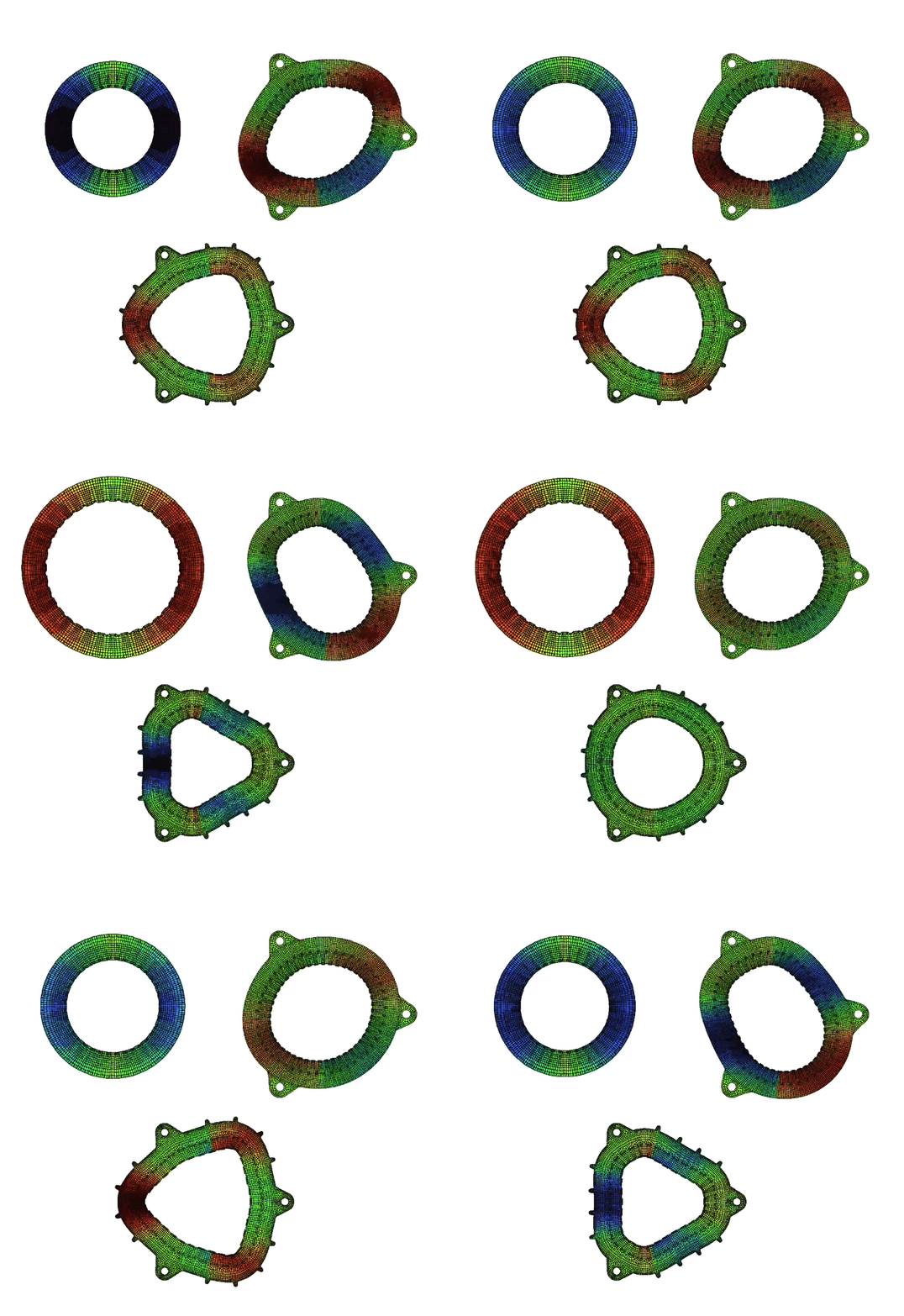
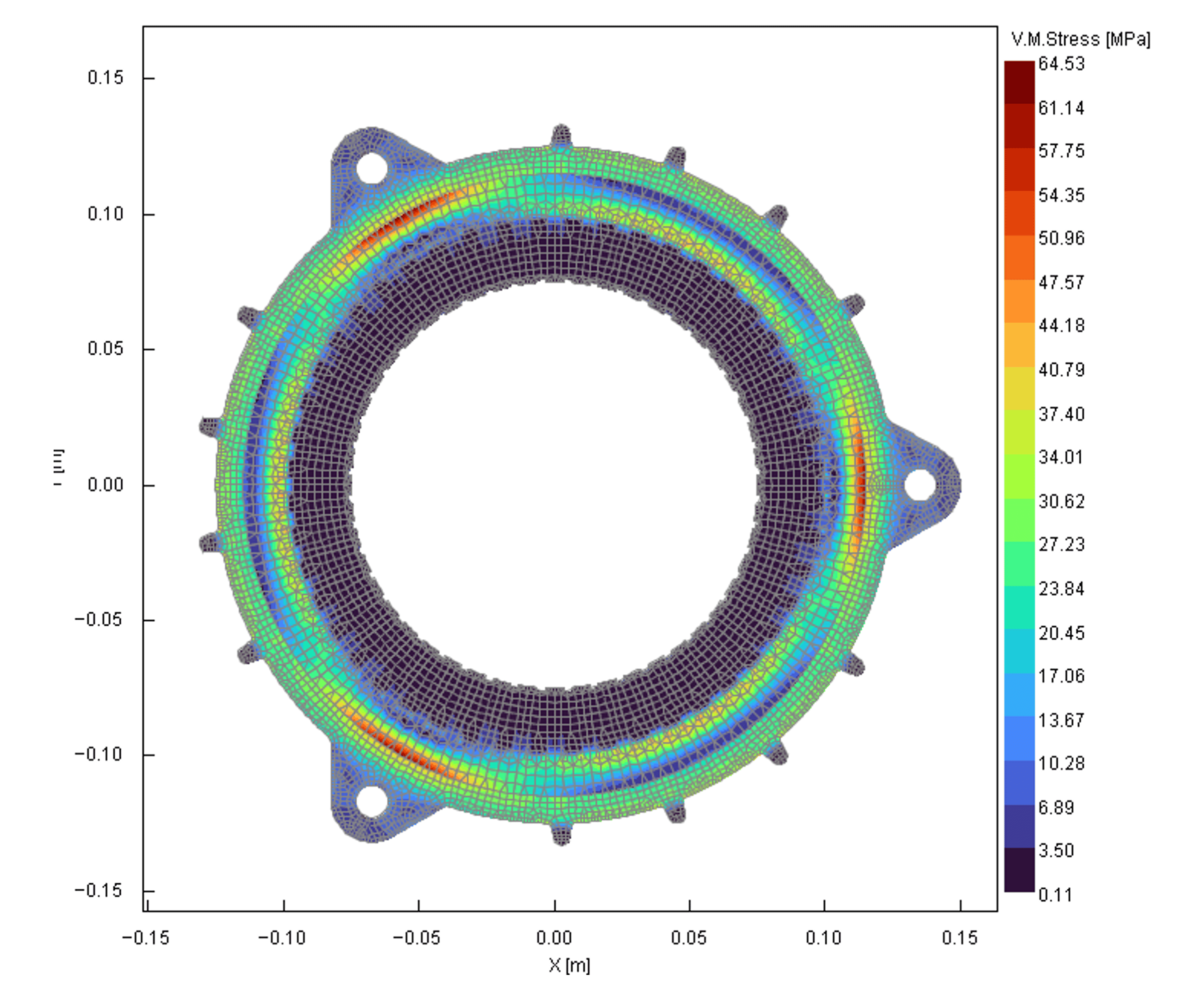
In v2027, we have added 2D finite-element-based NVH capabilities to GT-FEMAG, making it a powerful, one-stop multiphysics tool for electric motor design and analysis.
Parametric motor geometries and parametric housing, including lobes, windings and assembly constraints, can be created to accurately capture real-world assembly conditions.
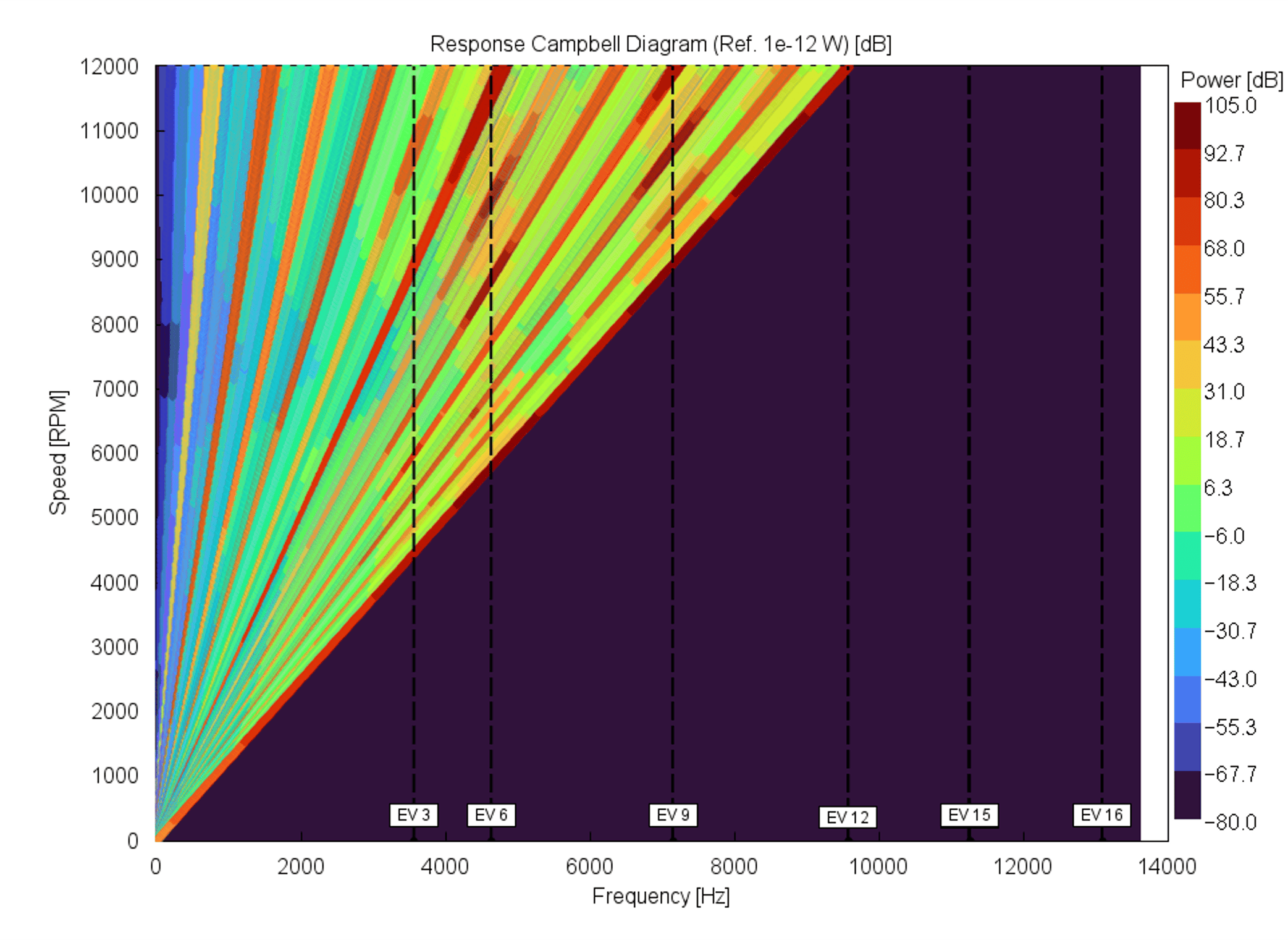
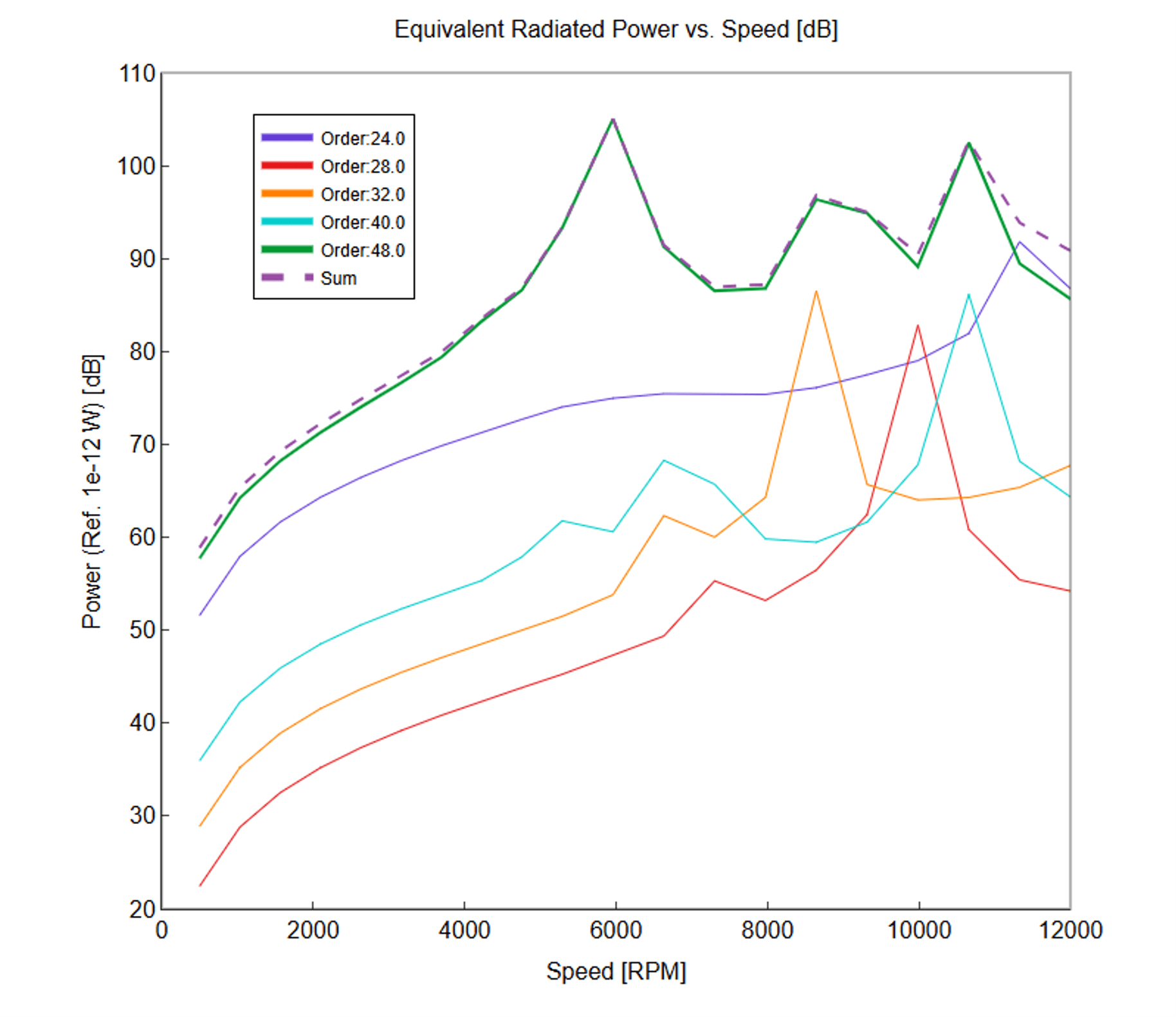
Free vibration analysis predicts eigenfrequencies and mode shapes, while forced frequency response analysis across the entire motor speed range enables the generation of order plots and Campbell diagrams.
A new shrink-fit analysis capability calculates stator and housing stresses and strains, improving simulation accuracy by accounting for assembly-induced effects.
On the 3D side, the NVH workflow has been significantly streamlined through automatic 2D-to-3D mesh extrusion and electromagnetic force mapping onto the meshed stator geometry, eliminating manual intervention. An external system housing can also be coupled to the 3D stator model in GT-SUITE to predict Equivalent Radiated Power (ERP) and acoustic Sound Pressure Levels (SPL).
GT-SUITE | POWER ELECTRONICS
Non-ideal Switch Modeling
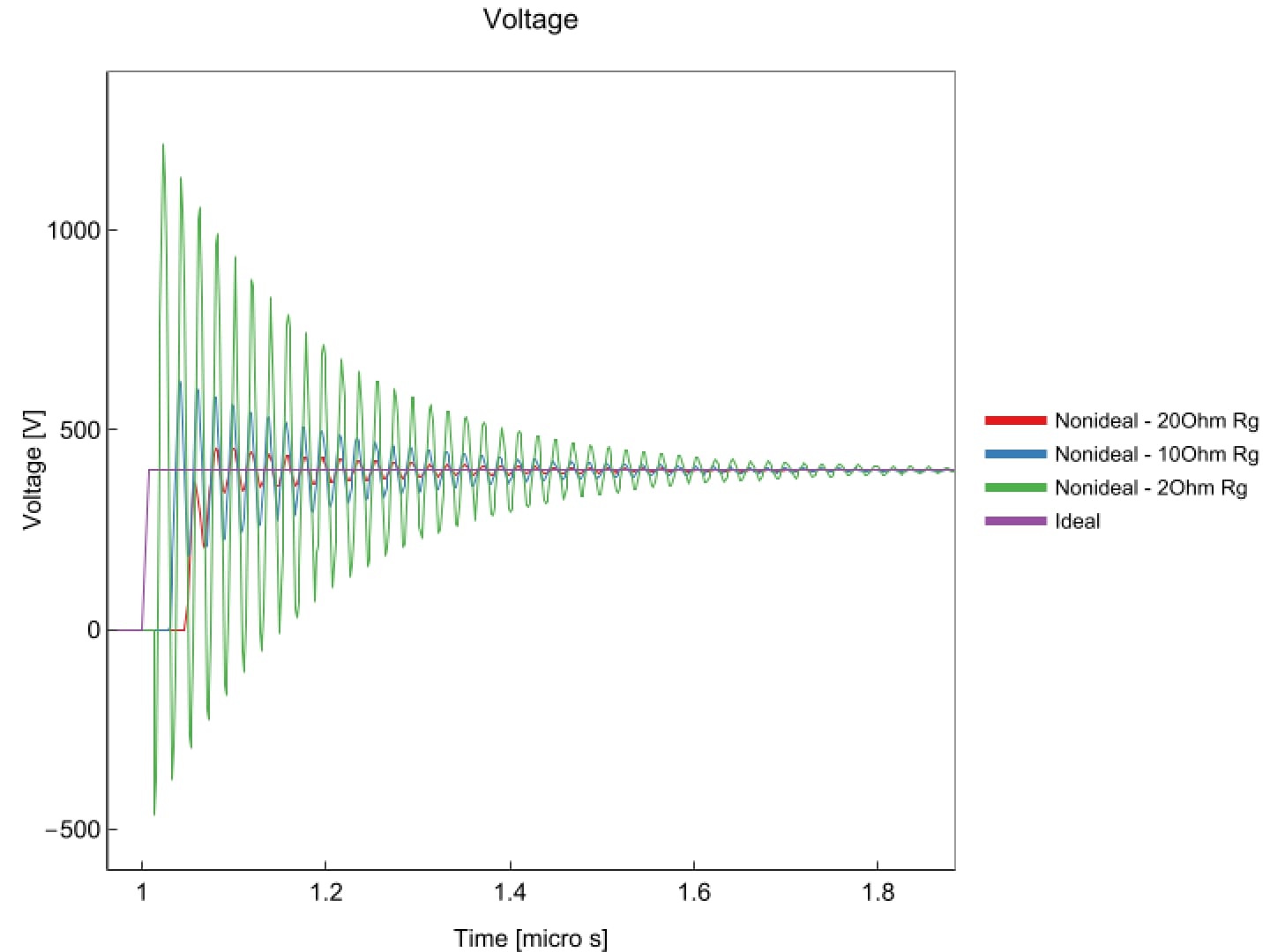
First-order power electronic models typically treat switches as ideal, flipping instantly between ON and OFF. In reality, each transition takes time and often involves voltage and current overshoot, ringing, and switching losses that affect converter efficiency and thermal design. Gate drive circuitry, parasitic inductances, and the device’s capacitance characteristics all shape this behavior.
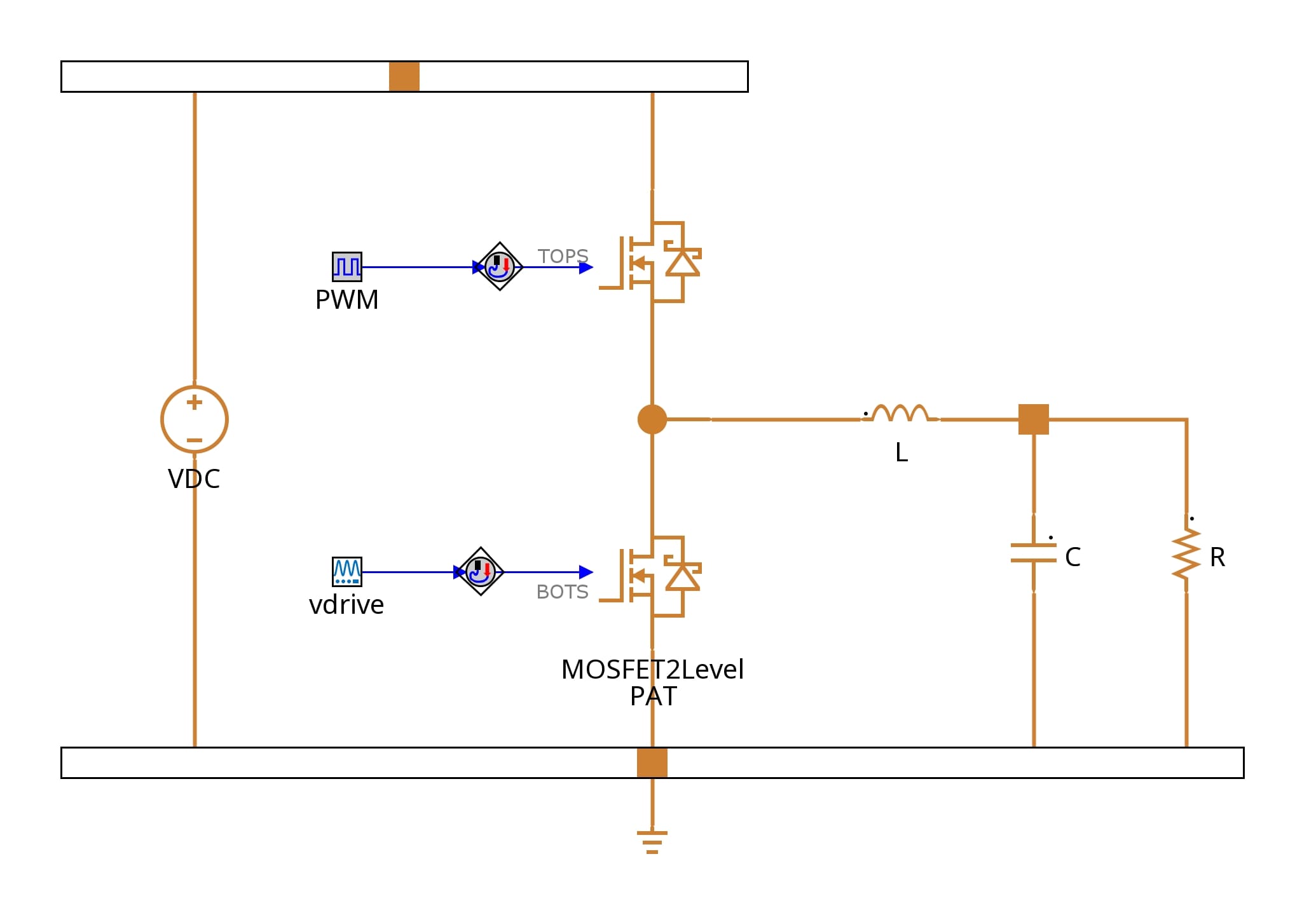
GT-SUITE v2027 introduces a new switch template, MOSFET2LevelPAT, which represents a 2-level half-bridge metal-oxide-semiconductor field-effect transistor (MOSFET) power module for detailed transient simulation, accounting for these nonidealities to capture realistic switching behavior. The template uses a piecewise analytical transient (PAT) approach, breaking each turn-on and turn-off event into a short sequence of stages: delay, voltage and current rise/fall, and ringing. A closed-form equation resolves each stage directly, without iterative numerical solving. Between switching events, the switches act as simple on/off elements, and the solver shortens its timestep only during switching stages. This keeps runtime fast while delivering realistic switching behavior.
GT-SUITE | ENGINE
Guided Engine Model Creation
Building a complete engine model from a blank sheet typically takes hours of setup work — and getting a team productive with the modeling practices behind it can take days of training.
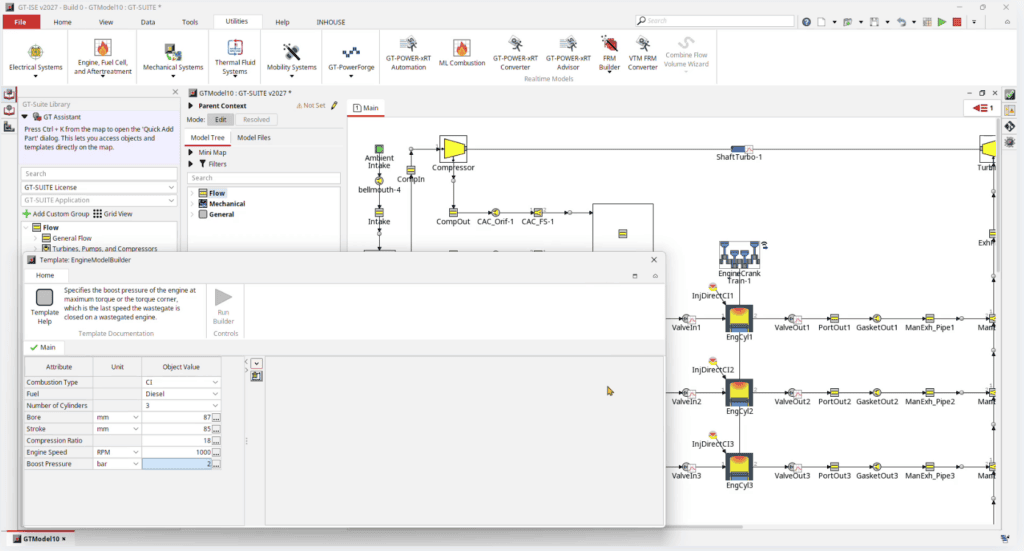
GT-SUITE v2027 introduces Engine Model Builder, a guided workflow that builds a complete engine model in seconds from a small set of user-provided inputs. This removes the need to construct components individually or master advanced modeling techniques up front.
The capability is designed for organizations requiring a rapid engine-modeling solution without significant GT-SUITE in-house experience, including turbocharger suppliers, marine propulsion and shipbuilding companies, and controls engineers looking to begin controller development ahead of detailed engine model availability.
In v2027, Engine Model Builder supports:
- Inline engine architectures (V-engine support is planned for v2028)
- Turbocharged configurations only
- Gasoline and diesel fuels only
Models generated with Engine Model Builder can be further customized using AI.modeler, part of the GT Intelligence Studio generative AI product family, to match individual project requirements, and development will continue in v2028 and beyond as additional architectures and fuel types are added.
GT-POWER-xRT | ENGINE
Machine Learning Combustion for Speed
Predictive combustion and emissions models are often the bottleneck in real-time engine models, especially as cylinder count increases.
-
Fully Automated Training Workflow
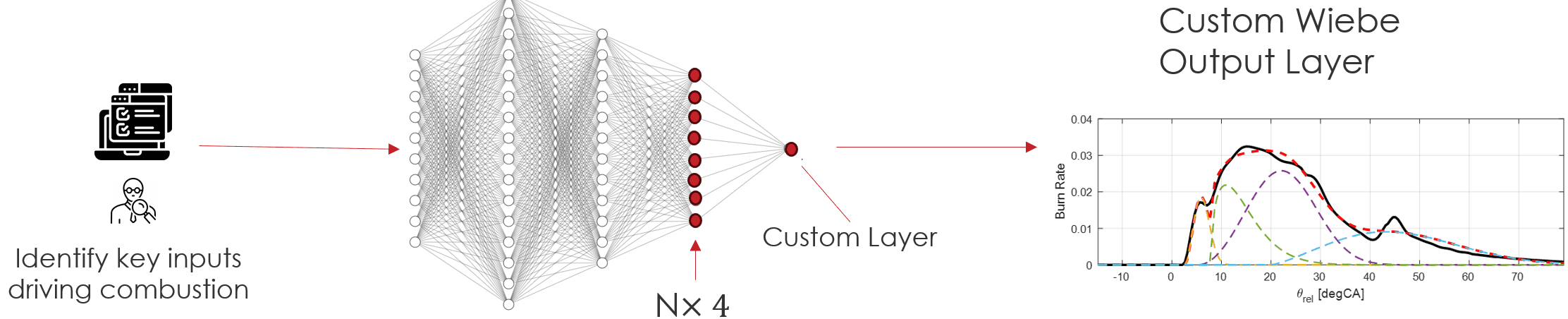
GT-SUITE v2027 introduces a new template for machine learning (ML)-based combustion, with a fully automated training workflow for spark-ignition (SI) combustion. Engineers do not need to take any manual actions during training. The workflow trains a neural network (NN) to represent the combustion process, and Wiebe profiles provide the underlying function that ensures the network produces reasonable burn rate shapes. Training infers the Wiebe parameters directly, so engineers do not need to identify them manually.

-
Reducing Computation time by 30%
In GT-POWER-xRT, the real-time capable version of GT-POWER, the ML-based template reduces computation time by up to 30% compared with the predictive combustion model. This headroom gives engineers a choice: retain higher fidelity in the intake and exhaust systems, take a smaller time step, or keep the same fidelity with fewer real-time overruns.
The template is also flexible enough to support other combustion types when engineers provide their own input signals. GT plans to add automated support for additional combustion modes, including compression ignition, dual fuel combustion, and pre-chamber combustion, in upcoming builds and versions.
GT-SUITE | ENGINE
Automated Conversion of Detailed Engine Models to GT-POWER-xRT
Building a calibrated real-time engine model for X-in-the-Loop (XiL) testing has taken an estimated 7 to 14 days of engineering time: 1 to 5 days to convert the baseline, 2 days to speed up the model, and up to 7 days to calibrate it.
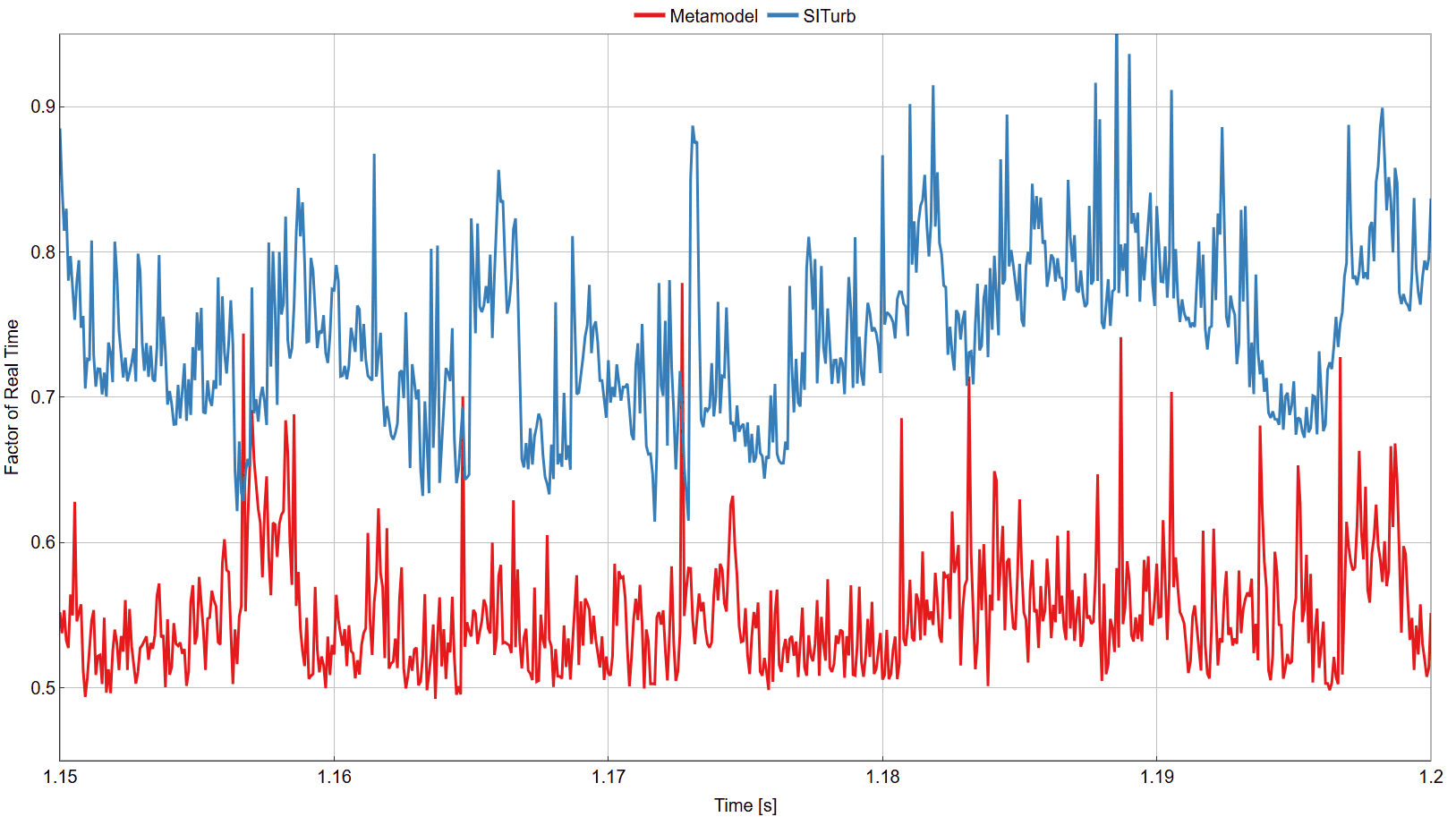
GT-SUITE v2027 introduces a single GT-POWER-xRT Automation wizard that takes a GT-POWER baseline model to a calibrated model, GT’s real-time engine models, in an expected 8 hours of engineering time. Engineers select the baseline model and a SimulinkHarness or FMUExport (Functional Mock-up Unit) co-simulation interface. The workflow delivers multiple calibrated XiL models that trade fidelity against runtime, plus a report comparing the baseline and generated xRT models.
Convert
Convert transforms a GT-POWER baseline model in one pass. It converts flow parts, removes features the xRT solver does not support, exports compressor and turbine maps.
Setup Output
Setup Output auto-detects engine topology, then builds the co-simulation interface with output signals, such as speed, torque, maximum cylinder pressure, and fuel flow. It also generates a post-processing network for brake-specific fuel consumption (BSFC), brake and indicated mean effective pressure (BMEP, IMEP), brake power, CA50 (crank angle of 50% burn), and volumetric efficiency.
Speed Up
Speed Up targets a real-time factor of 0.6. It merges short pipe segments into flowsplit volumes, adjusts discretization lengths, applies a fixed timestep, and remaps interface signal IDs automatically.
Calibration
Three scripts extract targets from the baseline .glx result file and configure the Design Optimizer:
- Airflow: Calibrates air mass flow, exhaust pressure downstream of the turbine, and exhaust gas temperature.
- SITurb: Calibrates the spark-ignition (SI) turbulent combustion model (EngCylCombSITurb) and cylinder heat transfer against BMEP, peak cylinder pressure, and CA50 targets.
- NOx: Calibrates nitrogen oxides (NOx) emissions against per-case mole-fraction targets.
Results
Results generate baseline-versus-xRT comparison plots in GT-POST, GT’s results viewer.
GT-SUITE | FUEL CELL
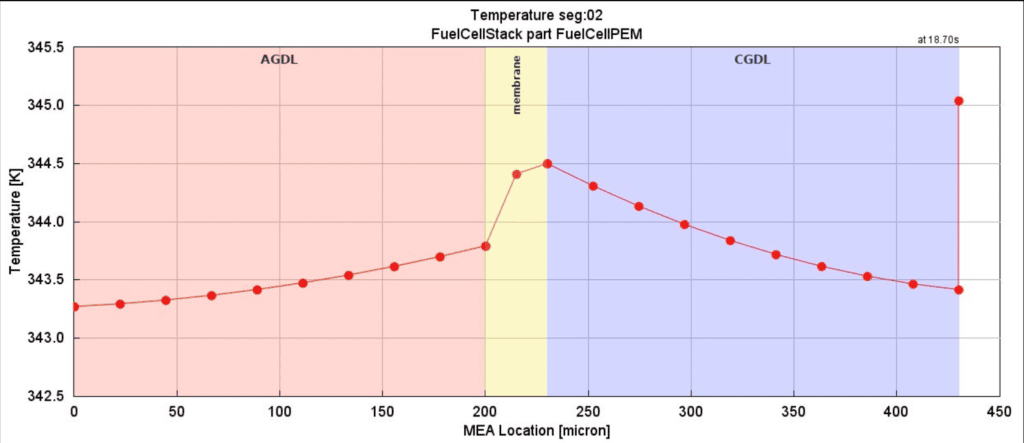
Detailed 1D Membrane Electrode Assembly Model
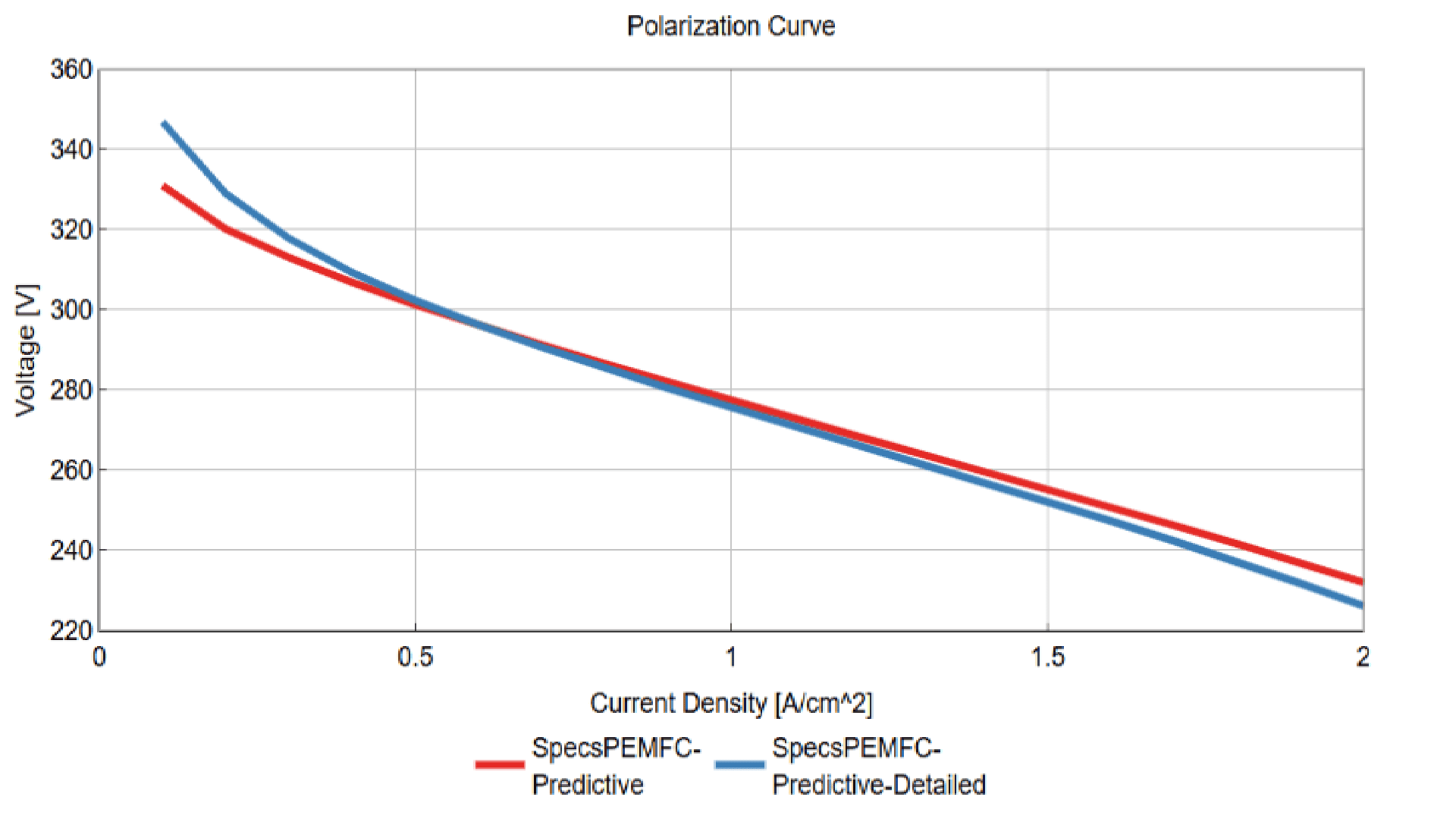
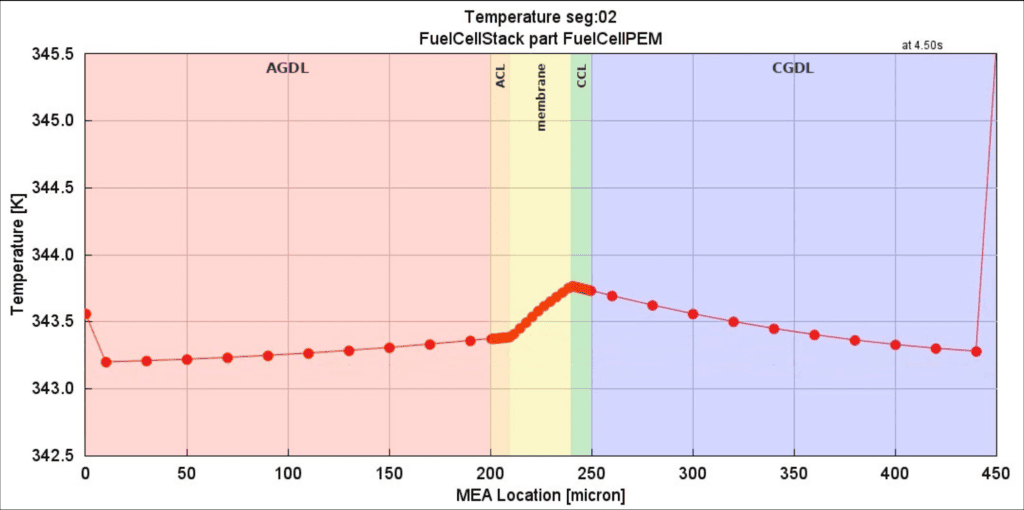
Predicting Proton Exchange Membrane (PEM) fuel cell behavior across different layers and operating conditions requires accurate resolution of the electrochemistry, thermal behavior, and water management inside the membrane electrode assembly (MEA). GT-SUITE v2027 introduces SpecsPEMFC-Predictive-Detailed, a new predictive 1D electrochemical template that fully resolves the MEA, including both catalyst layers and the membrane.
The model solves electron and proton transport across every layer, driven by the electrochemical reactions, together with species transport and thermal behavior. It resolves dissolved water in the membrane and the catalyst layers and includes a two-phase flow model for water. Engineers define the discretization of each layer to increase the precision of the results. The model runs transiently and couples with the GT-SUITE 1D flow and thermal solver.
This coupling lets engineers use the same template in stack models, Balance of Plant (BoP) models, and system-level topology and vehicle models. The template suits detailed studies of specific applications, such as evaluating material or operating-condition variations at the model level.
GT-xCHEM | CHEMICAL
Catalyzed Heat Exchangers
Chemical processing plants often use catalyzed heat exchangers to maximize both energy efficiency and species conversion rates.
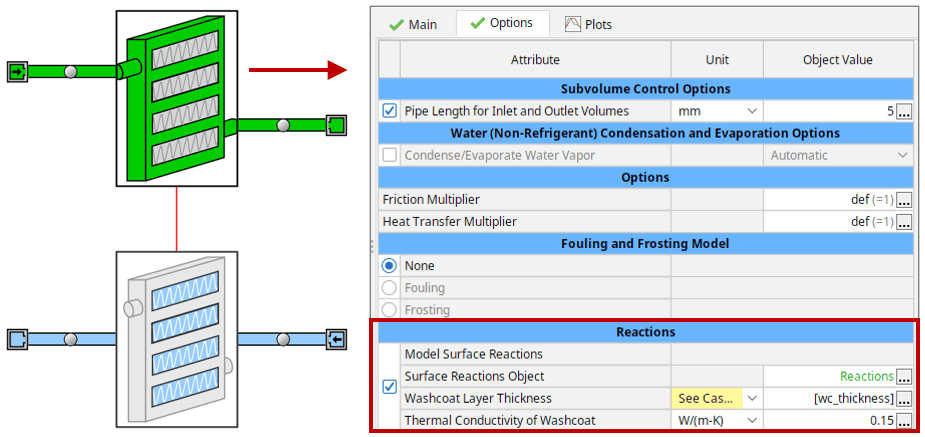
GT-xCHEM v2027 introduces SurfaceReactionsRef, a reference object version of the SurfaceReactions template that lets engineers define catalytic reactions directly within a heat exchanger model. Engineers can now apply SurfaceReactionsRef in the existing HX*Main and HX*Secondary templates, coupling heat transfer and surface chemistry in a single unified model. The feature is activated by defining a washcoat layer and a SurfaceReactionsRef object in the heat exchanger template.
Typical applications include:
- Methane and methanol reformers
- Water adsorbers (desiccant coated)
- Other catalyzed heat exchangers
GT-xCHEM | CHEMICAL
External Condenser and Reboiler Options
Distillation processes may call for condenser and reboiler configurations that fall outside the standard design, forcing engineers to either accept a built-in model or omit the effect from their simulation entirely.
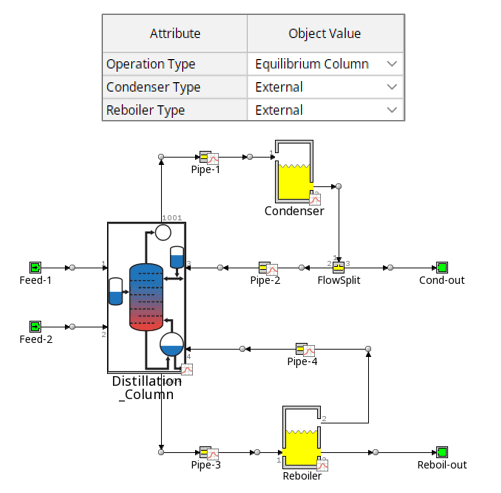
GT-SUITE v2027 lets the DistillationColumn template represent its condenser and reboiler parts by using external flow components instead of the internal models, opening the door to custom designs that the built-in options can’t capture. Engineers activate this by setting the Condenser Type and/or Reboiler Type flag to “external,” and the option can be applied to the condenser only, the reboiler only, or both simultaneously giving full flexibility to customize the design and model non-standard configurations.
GT-xCHEM | CHEMICAL
Packed Bed Liquid Film Enhancement Model
Selecting the right packing material for a gas-liquid absorption column, used for example, in CO₂ or SO₂ capture, directly affects how efficiently the column removes the target species, but earlier simulation approaches treated the liquid-phase reaction enhancement as an arbitrary value rather than a value derived from the actual physics in the packed bed.
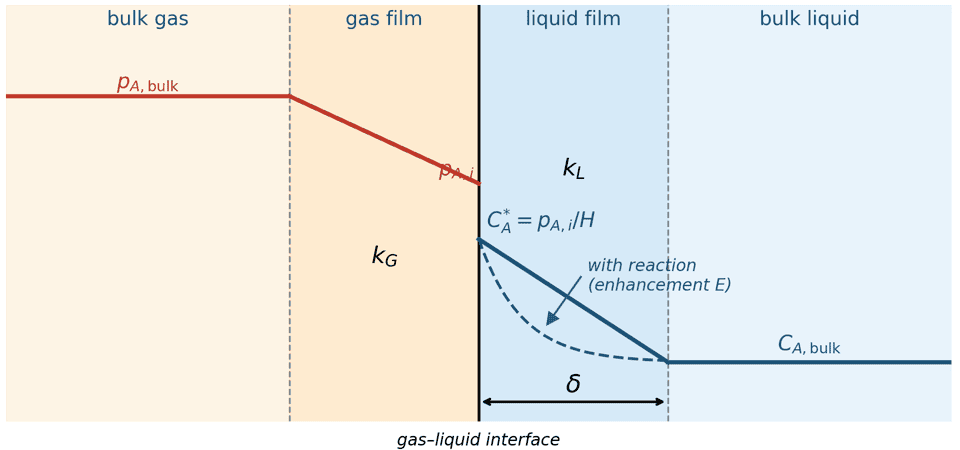
GT-SUITE v2027 adds ten packing material options to the PackedBed template used within the AbsorptionColumn template, with the internal geometry and liquid film properties adjusted automatically for each material. This replaces the previous hard-coded implementation of the liquid film enhancement factor (E) with a new model in which film thickness is governed by local physics and the properties of the selected packing material.
Near the gas–liquid interface, the absorbing species accumulates faster than molecular diffusion alone can carry it into the bulk liquid, which limits the mass-transfer rate. The enhancement factor quantifies how much the liquid-phase reactions raise that rate by consuming the dissolved species and sustaining a steeper concentration gradient at the interface. By resolving E from first principles, GT-xCHEM, GT’s chemical kinetics and aftertreatment modeling tool, captures the true reaction-absorption rate rather than the diffusion-limited rate, giving a more accurate picture of column performance.
Engineers can plot species conversion efficiency against liquid flow rate and porosity to identify the ideal operating window for a given material. Below a material’s porosity threshold, the liquid film floods the void space and blocks gas flow entirely, halting conversion. This information allows engineers to choose the packing material, porosity, and flow rate together to optimize the packed bed absorption column design.
GT-xCHEM | CHEMICAL
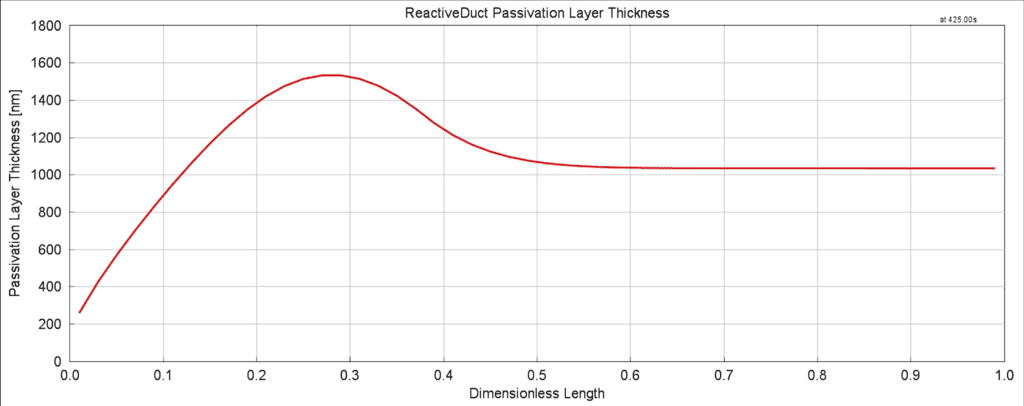
Passivation Layer Modeling
Metals described as “corrosion-resistant” rely on a thin protective oxide layer, a passive film, that forms on the surface and governs how the material actually behaves in service. When that film grows, depletes, or breaks down unevenly, corrosion resistance can fail in ways that are difficult to predict from bulk material properties alone.
GT-xCHEM, GT’s chemical kinetics and aftertreatment modeling tool, now includes a passivation layer model in the ReactiveDuct template to support passivation-controlled corrosion through a dedicated passive-film reaction framework. The framework tracks dynamic passive-film growth and depletion over time, capturing how the protective layer thickens, thins, or locally breaks down under operating conditions. A reaction-diffusion solver accounts for film diffusion resistance as solvent and ionic species move through the passivation layer, while ohmic resistance from both solid-phase and ionic conductivity is included to reflect the layer’s electrical behavior. Together, these additions let engineers model passivation-controlled corrosion with a level of physical detail that simple bulk-corrosion assumptions cannot capture.
The framework models:
- Dynamic passive-film growth and depletion
- Solvent and ion transport through the passive film
- Film diffusion resistance within a reaction-diffusion solver
- Ohmic resistance from solid and ionic conductivity
GT-SUITE | MECHANICS
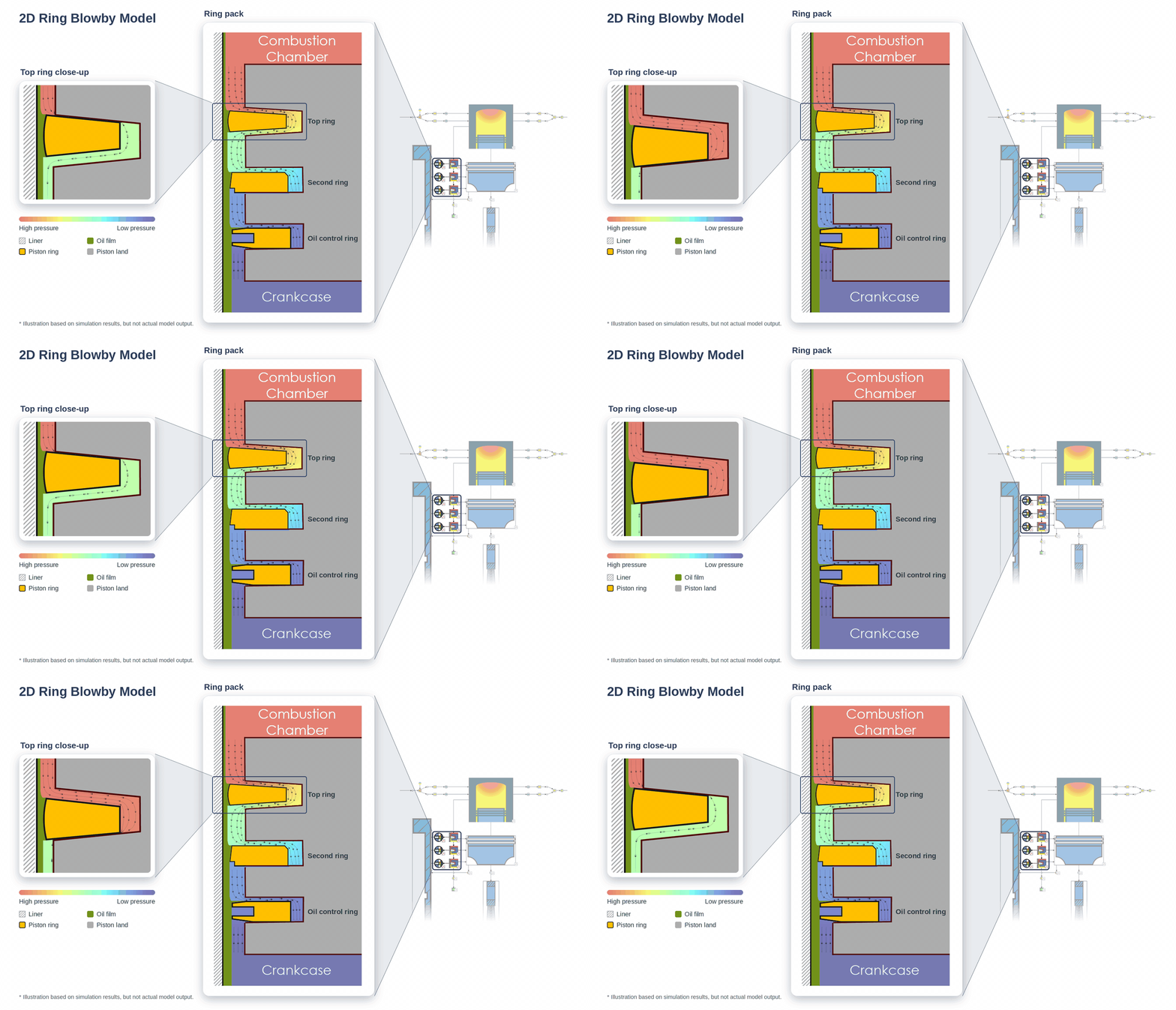
2D Ring Blowby Model
Modern piston ring and groove designs increasingly use keystone, notched, and chamfered profiles that fall outside what existing 1D ring blowby models can capture. GT-SUITE v2027 introduces a new 2D Ring Blowby Model that fully couples ring structural dynamics with 1D inter-ring gas flow for a far more realistic picture of ring sealing and motion.
The model resolves ring motion in two dimensions (radial displacement, toroidal twist, and axial displacement, all coupled) against the true ring and groove cross-section. Cross-sections are now defined parametrically, so engineers can sweep chamfers, notches, and keystone angles for DOEs and optimize geometry without rebuilding the model.
This is underpinned by a formal, strong coupling between the fluid (gas) solution and the ring’s multi-body dynamics solution, replacing the loosely coupled 1D blowby approach and improving the accuracy of predicted blowby, ring flutter, and sealing performance.
Model setup is also far simpler, requiring significantly fewer attributes and connections than the prior workflow.
Existing submodels for ring lubrication and friction, ring-bore conformability, and oil consumption carry over unchanged, and the model integrates directly with GT-POWER through the standalone PistonRing2DBlowby template.
GT-SUITE | MECHANICS
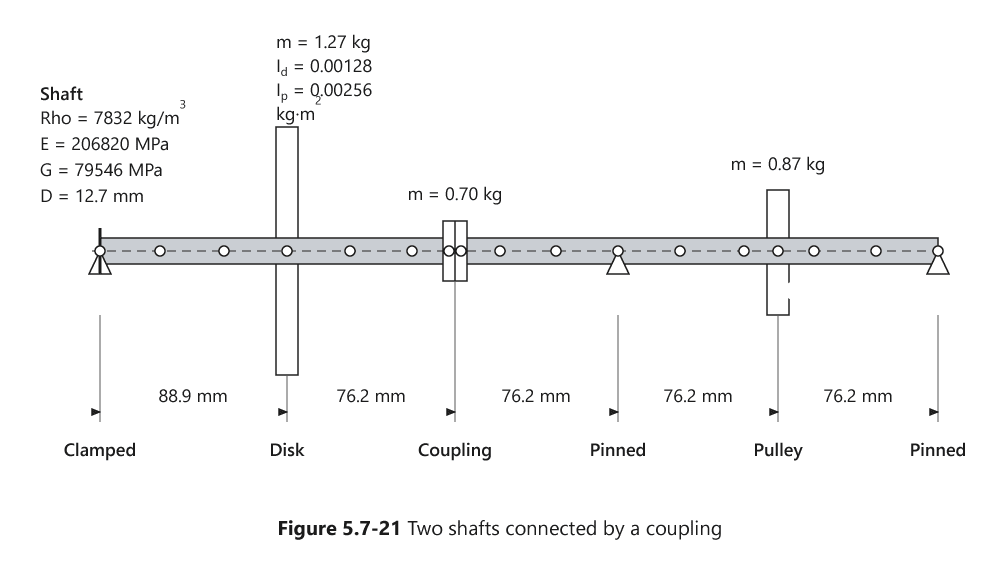
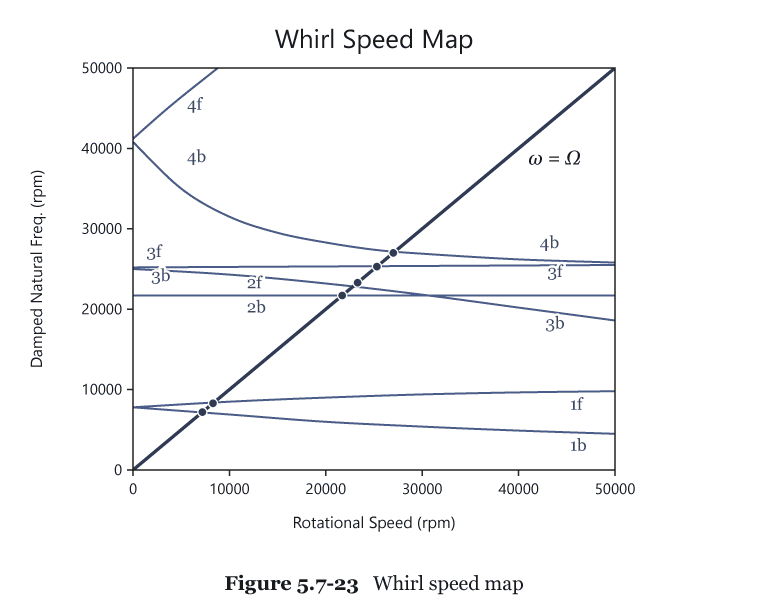
Frequency-domain rotordynamics analysis
To prevent resonance, turbines, compressors, and pumps must avoid speeds at which excitation orders coincide with rotor natural frequencies. Engineers therefore need to map these frequencies across the full operating-speed range early in the design process.
GT-SUITE v2027 adds a rotordynamics option to the 3D frequency-domain analysis (MechFreqAnalysis3D), solving free and forced vibration for assemblies of 3D beams and rigid bodies supported to ground through springs and dampers. The solver includes gyroscopic effects, which split forward and backward whirl frequencies, and offers optional centrifugal stiffening for long, slender components. Engineers choose a fixed reference frame to model asymmetric stator properties, or a rotating frame to model asymmetric rotors.
Campbell diagrams track each mode automatically across the speed range, so engineers can identify critical speeds directly and animate mode shapes at any chosen speed. Engineers apply unbalanced or oscillating forces as boundary conditions on the rotating model to evaluate forced response in the same analysis.
Validation cases cover rigid rotors on flexible supports with isotropic and anisotropic bearings, a flexible rotor compared against an independent finite element model, and a rotating asymmetric cantilever beam, where bending mode frequencies agree with analytical values within 2%.
GT-SUITE | MOBILITY SYTEMS XiL
System Integration and Co-Simulation
Engineers increasingly need to deploy simulation models across diverse target environments — from hardware-in-the-loop test benches to embedded and edge compute devices — without maintaining separate export workflows for each. GT-SUITE v2027 expands its Functional Mock-up Interface (FMI) capabilities across three fronts: remote .dat file creation, third-generation FMI standard support on Hardware-in-the-Loop (HiL) platforms, and a new FMUExport solution for edge compute deployment.
Remote .dat File Creation | Previously, incorporating a GT-SUITE model into a modular, multi-team workflow meant exporting a separate Functional Mock-up Unit (FMU) for each configuration needed, an approach that did not scale as the number of variants grew. GT-SUITE v2027 introduces remote .dat file creation for exported FMUs, letting teams generate the data a standalone FMU needs without re-exporting the FMU itself, so a single exported FMU can serve multiple configurations.
FMI 3.0 on HiL | Hardware-in-the-Loop (HiL) users were previously limited to FMI 2.0, unable to take advantage of newer FMI standard capabilities on their test benches. GT-SUITE v2027 adds support for FMI 3.0 on HiL platforms, giving engineers access to table parameters, a capability unavailable in FMI 2.0 for more flexible real-time model configuration.
FMUExport for Edge Compute Deployment | Edge compute devices typically digest only raw C code FMUs, making it cumbersome to deploy GT-SUITE metamodels, reduced-order models built for fast, low-resource execution, to embedded and rapid control prototype (RCP) targets. GT-SUITE v2027 introduces an FMUExport solution that streamlines this deployment path, exporting GT metamodels directly as C code FMUs ready for edge and microcontroller targets.

GT-RealDrive | MOBILITY SYSTEMS XiL
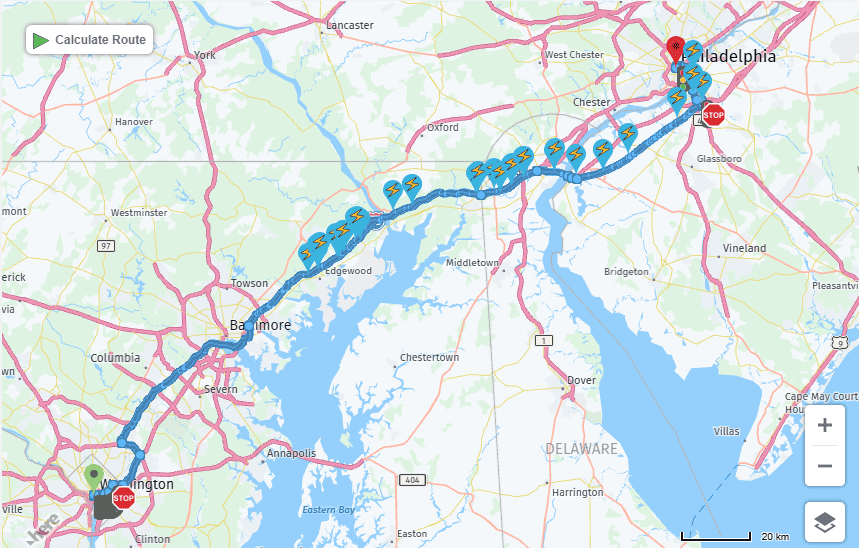
Electric Vehicle (EV) range limitations mean a simulated route from point A to point B is only useful if it reflects how the vehicle will actually be driven; including where and how long it stops to recharge along the way.
GT-RealDrive now includes an EV Charging Stations capability which searches for and inserts real charging stops directly into a calculated route, combining route planning and charging infrastructure in a single interface. Engineers set a search start location along the route, then define a search corridor distance that controls how far off the main path GT-RealDrive will look for stations. Results can be filtered by connector type, including CHAdeMO, CCS1, CCS2, Type 1 (J1772), Type 2, and Tesla. Each matched station returns its location, supplier name, stop duration, and the number and maximum power rating of connectors available per type. Because GT-RealDrive draws on GT-SUITE’s physics-based vehicle model, energy consumption between stops reflects real driving conditions rather than a simplified range estimate.
The result is a route that accounts for real-world charging infrastructure and connector compatibility, letting engineers validate range, charging strategy, and trip-time assumptions for a specific EV program without manually researching or inserting charging stops.
GT-SUITE | MOBILITY SYSTEMS XiL
Simulation Summary
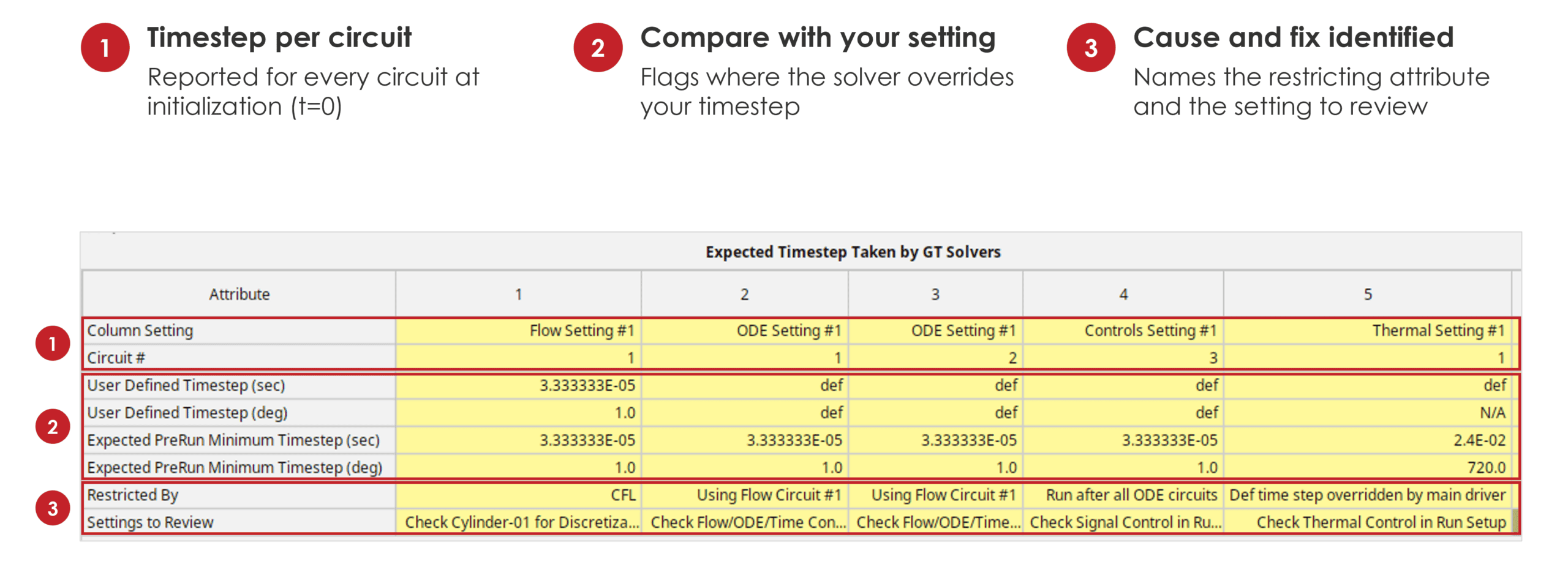
Complex GT-SUITE models that combine multiple circuits, physics domains, Simulink models, Dynamic Link Libraries (DLLs), and Functional Mock-up Units (FMUs) can make timestepping behavior difficult to trace, since any one of these components can silently constrain the solver.
GT-SUITE v2027 introduces Simulation Summary, a diagnostic view that collects every model setting and input influencing timestep size into a single location and analyzes the model for timestepping restrictions and bottlenecks. It catches issues across two common scenarios: a Simulink DLL nested inside an external subassembly that forces the solver to substep to match the Simulink timestep, and complex multi-physics models where the timestep interactions between different integrators are difficult to reason about manually. Restrictions like these previously took hours to trace by hand; engineers now identify them in minutes, making it easy to confirm that timestep behavior is intentional rather than an artifact of a buried coupling or an unexamined integrator interaction.
GT-SUITE | UX FEATURES
Engineering Project Organization
Modern engineering models routinely span 10–100 files, 1,000-plus parameters, and 20–100 cases built by multiple teams, making it hard to know which file version is current, where data is being reused, and whether changes in one place have rippled through the rest of the project.
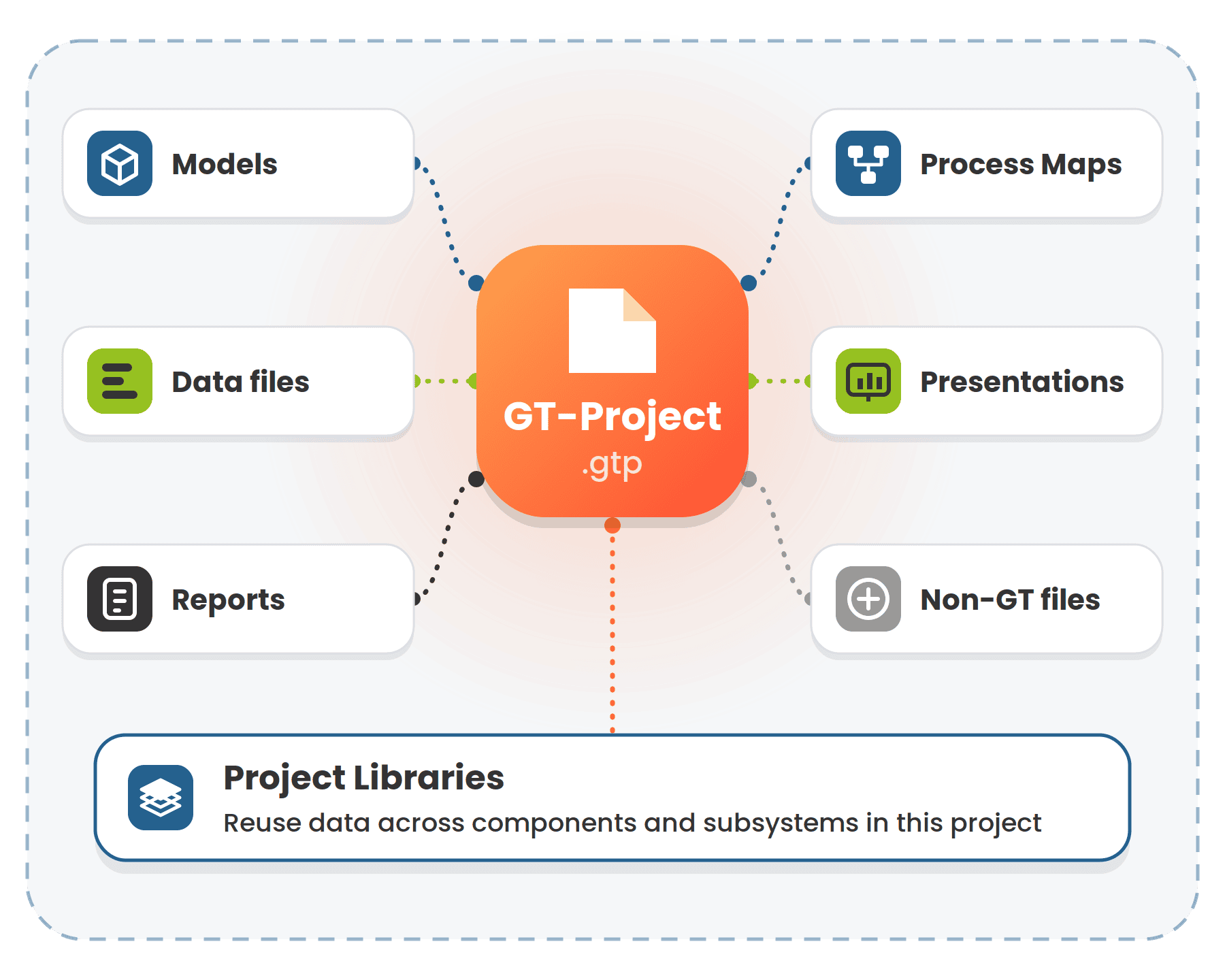
GT-SUITE v2027 introduces GT-Project, a new “Project” file (.gtp) that gathers every file tied to an engineering development program, model files, data files, reports, presentations, Process Maps, and even non-GT files, into a single structure. The new Project Explorer panel gives engineers full visibility into where each file is stored and used, with the ability to swap one file for another directly from the panel.
Global and Project Libraries
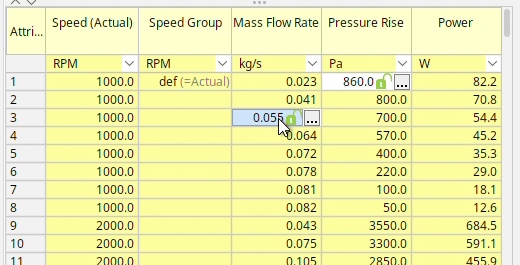
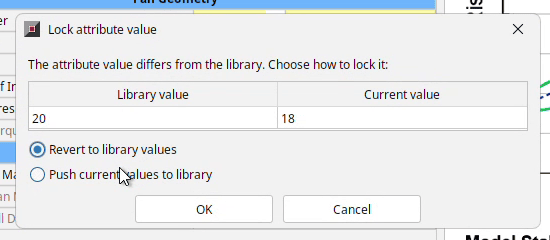
Library-linked values were previously all-or-nothing, locked in full once tied to a library. GT-Project lets engineers unlock individual attributes or elements within a library-linked object, modify and test the change locally, and then either revert it or push it back to the library once validated.
Existing user object libraries are renamed Global Libraries, reserved for elements meant to be reused across every project in a company. A new Project Libraries tier adds an intermediate scope: data reused only within a single project. Reusable components and subsystems can point to project-specific data, company-wide Global Library data, or both.
GT-SUITE | UX FEATURES
Case Grouping
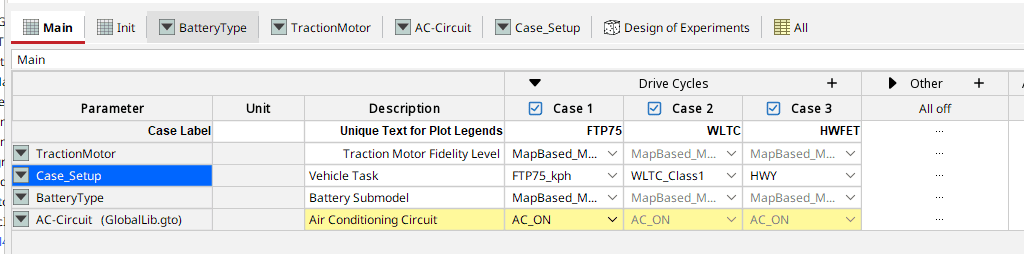
Related cases can now be organized into collapsible groups within Case Setup rather than a single flat list, with contextual actions and drag-and-drop support. The improvement targets models built with dozens of cases, where flat lists become difficult to navigate.
GT-SUITE | UX FEATURES
Resolved Mode
Hierarchical, modular models support reuse and parallel work across teams, but that structure has historically made parameter values harder to see and navigate.

GT-SUITE | UX FEATURES
Git Conflict Resolution in GT
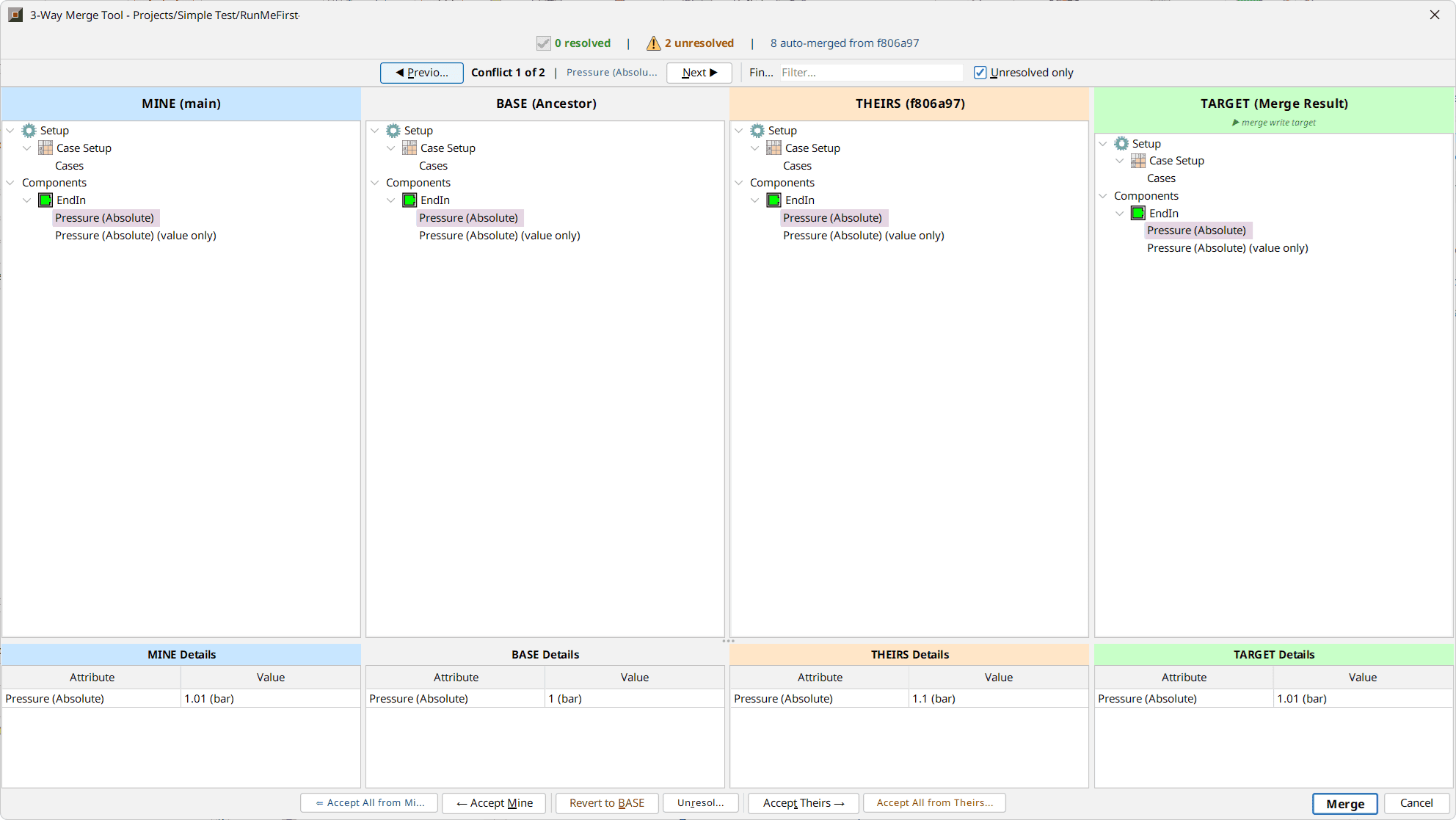
GT v2027.0 introduces a 3-way merge tool, available as a beta release, that resolves these conflicts directly within the environment. The tool displays four synchronized views of the model tree — Ours, Base (the common ancestor), Theirs, and Target (the result to be merged) — so engineers can see exactly what changed and why, side by side, instead of reconciling differences by hand.
Conflicts can be resolved individually or all at once, with the merged result previewed live before anything is written to disk. By resolving conflicts inline with full context on both sides, the tool substantially cuts the manual effort merges previously required, though the time saved varies by model size and workflow. Additional improvements are planned for v2027.1.
GT-SUITE | UX FEATURES
Dark Mode For Desktop Applications
Engineers running long simulation and post-processing sessions frequently work in low-light environments, where bright interfaces contribute to eye strain and can pose accessibility challenges over extended use.
GT-SUITE v2027 introduces a Dark Mode theme across all GT desktop applications — GT-ISE, GT-POST, and GEM3D. Users choose between Light, Dark, and System Default, with System Default automatically matching the operating system’s active theme. The selected mode takes effect after an application restart and applies consistently across the interface, reducing glare during long working sessions and giving users more control over how the workspace looks and feels.