







Overview
Turbocharger selection is among the most frequently repeated analyses in engine development. Every new engine variant, every vehicle platform derivative, and every revision of a performance or emissions target requires the same matching exercise: assemble the candidate maps, evaluate each pairing on the engine model, and identify which candidates satisfy the applicable performance and durability criteria.
The procedure itself is rarely the difficulty. Most organizations have refined it over many programs, documented it, and expect it to be executed identically each time. The difficulty is that the procedure is long, strictly sequential, and executed by hand, which means its consistency depends on the engineer performing it rather than on the procedure itself. A documented workflow and a reliably executed workflow are not the same thing, and the gap between them widens with every additional candidate in the study.
With an AI Skill built into GT-SUITE, one multi-candidate study fell from an estimated 40 hours to about 4, with the same maps, criteria, and underlying simulation model.
The Engineering Challenge Behind Turbocharger Selection
A matching study is not a single calculation. It is a set of candidate combinations evaluated against a set of criteria, where every candidate must be built, configured, solved, and assessed identically for the comparison between them to mean anything. The work decomposes into steps that each carry their own failure modes:
• The Baseline Model. All variants derive from one baseline. It must be interrogated to locate the relevant components, map objects, cases, and cycle settings, and must remain unmodified so that differences between variants are attributable to the maps alone.
• Turbomap Definition. Turbine and compressor maps can be added to a GT model, with the associated object names and map combinations to be iterated against the baseline model specified in the table. A combination table is used to define the turbine and compressor map labels along with the corresponding speed limits to be applied.
• Map Availability. A map named in the combination table may not exist as an object in the baseline yet. Any missing map has to be brought in from the library before the corresponding variant can be built at all.
• Per-variant Configuration. Each variant needs its maps assigned, its maximum speed set, and its cases and cycles configured consistently with every other variant. An inconsistency here produces a result that solves cleanly and compares meaninglessly.
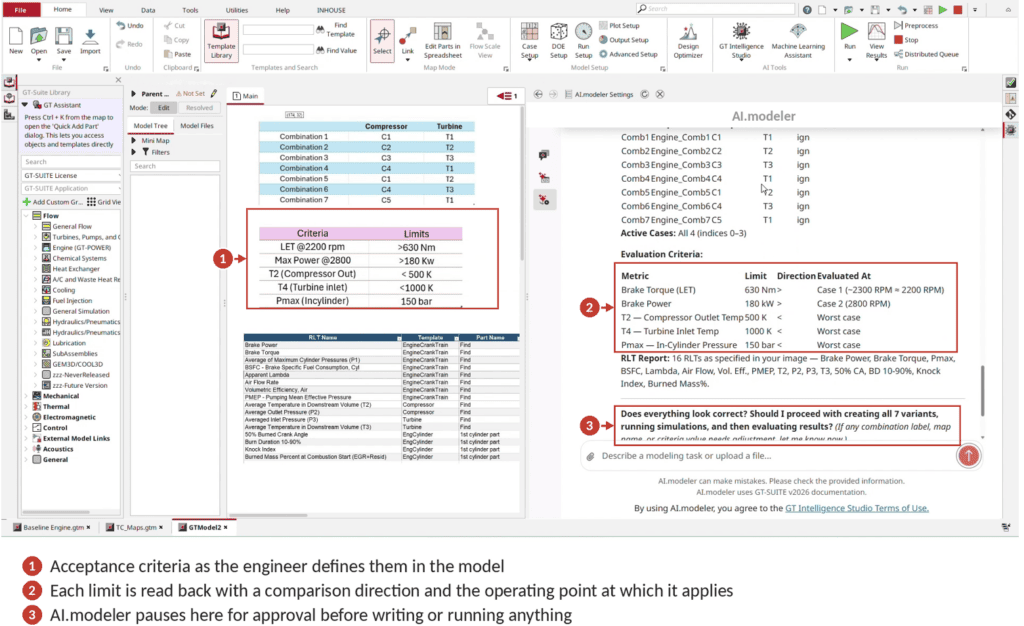
• Selection Criteria. Candidates are assessed simultaneously against performance targets and against hardware and durability limits. Each limit carries a direction of comparison and an operating point at which it applies, and a candidate is admissible only if it satisfies all of them.
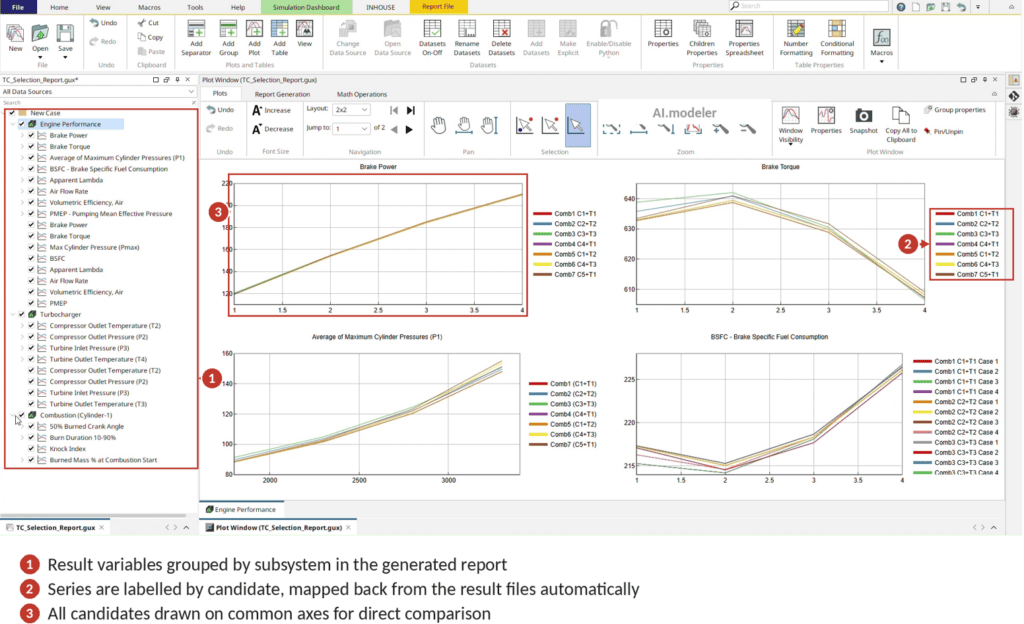
• Post-processing. Comparison requires that the correct result variables be extracted from every output file, that files be mapped back to their candidate labels without error, and that all candidates be plotted on common axes.
Each step depends on the one before it. Omit the map-copy step and the variant will not preprocess. Set a speed limit incorrectly and the variant is no longer comparable to the rest. Map a filename to the wrong label in post-processing and a conclusion inverts while every plot still looks entirely reasonable. None of this is conceptually demanding. The demand is that all of it be performed identically, N times, without omission, on a schedule set by the program rather than by the engineer.
Capturing the Procedure as a Skill
GT Intelligence Studio brings AI into the simulation workflow, with AI.modeler, AI.advisor, and AI.coder working alongside the engineer on GT-SUITE models. AI.modeler is the part that works directly on your GT-SUITE models, carrying out engineering tasks on the model itself.
AI.modeler provides a set of built-in Skills that cover general modelling utilities. The workflow presented here does not belong to that set. It is a custom Skill, authored by the engineer and retained in the user’s own Skills library, and it is activated for a session as and when required.
A Skill in AI.modeler is a set of steps that AI.modeler runs on your own GT-SUITE model. It takes a procedure you have already written down and makes it something the software can carry out. The order of the steps, the checks at each step, and the points where it must ask you before going ahead are all fixed in advance, and it follows the same order every time.
This helps more in turbocharger selection than in a study you run only once. A matching procedure built up over several programs holds a lot of useful judgement, but today that judgement sits in a document that an engineer has to read and apply by hand. Writing it as a Skill keeps the judgement and removes the manual work, which is the part that changes from engineer to engineer and from program to program.
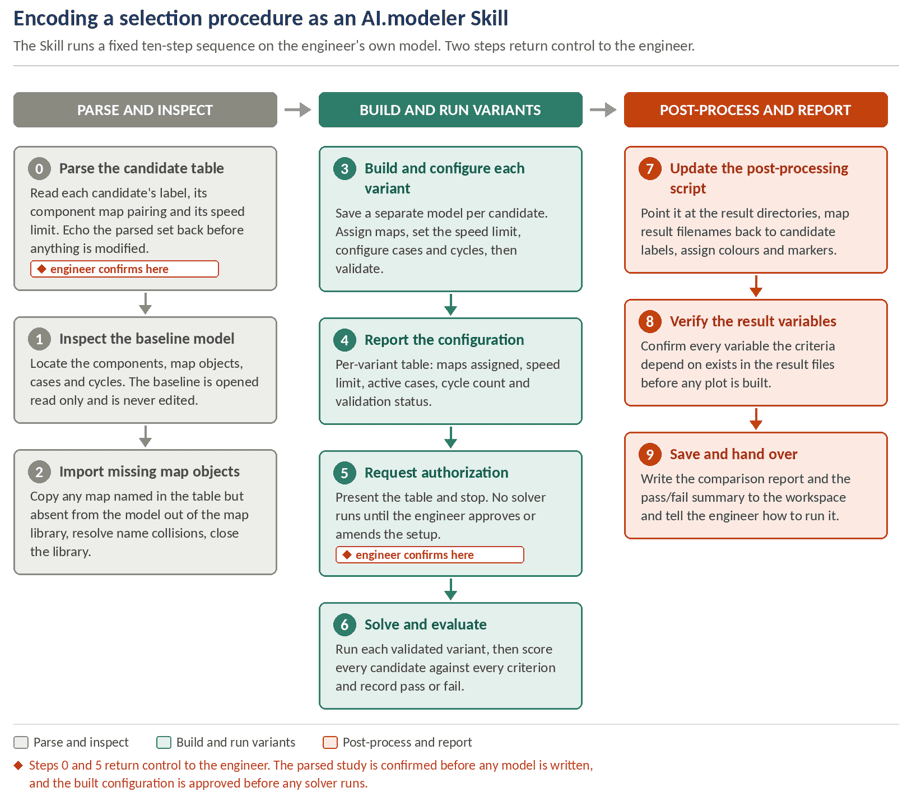
The procedure discussed here resolves into ten steps, grouped into three phases. Two of those steps deliberately hand control back to the engineer.
How the Skill Executes the Workflow
The engineer invokes the Skill with a single instruction naming the baseline model, the combination table, and the evaluation criteria. What follows is the ten-step sequence in detail.
Phase 1: Parsing and inspecting before anything is written
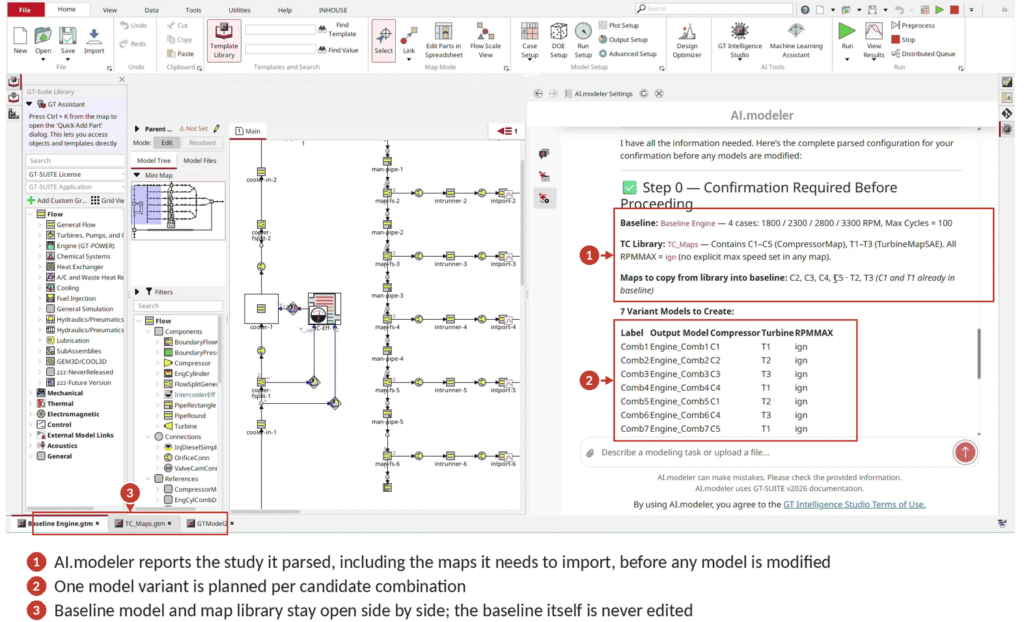
Step 0: Parse and confirm the candidate table. The Skill reads the combination table and extracts, per candidate, its label, its map pairing, and its speed limit, then echoes the parsed set back to the engineer. This is a deliberate checkpoint: a misread table would otherwise propagate into every variant downstream, and the cheapest place to catch it is before any file is touched.
Step 1: Inspect the baseline model. The Skill locates the components, the map of objects, the existing cases, and the cycle settings in the baseline, and reads the active case count and cycle limit from the model rather than assuming them. The baseline is opened read-only and is never edited, which is what allows every result to be traced back to a single common reference.
Step 2: Import missing map objects. Any map named in the combination table but absent from the baseline is copied in from the map library. Name collisions between the library and the baseline are detected and resolved, and the library is closed before the build phase begins. Skipping this step is the most common manual omission, and it produces a variant that will not preprocess.
Phase 2: Building, validating, and running the variants
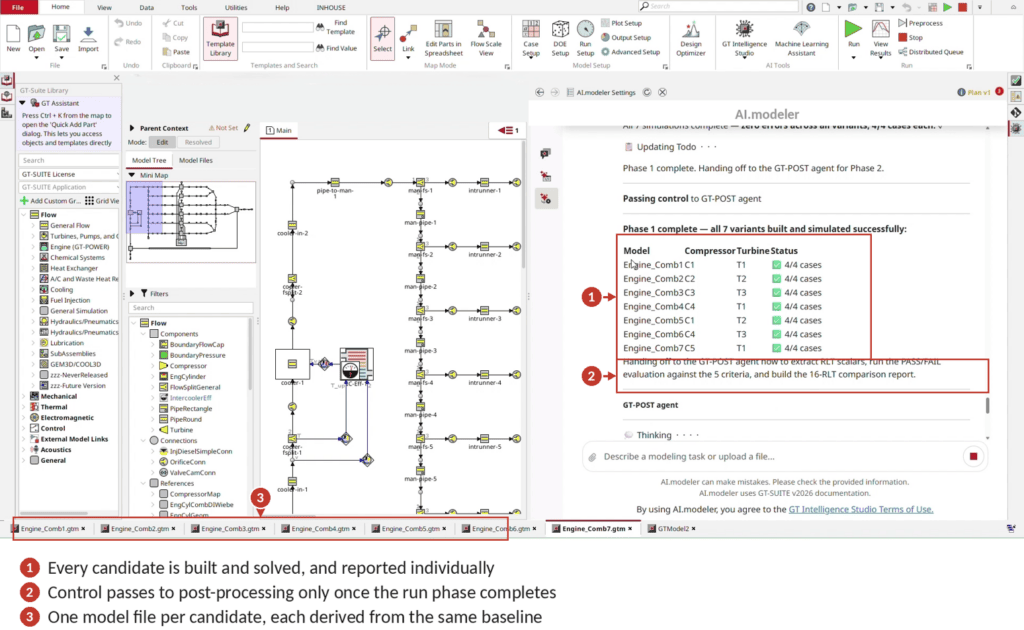
Step 3: Build and configure each variant. For each candidate the Skill saves a separate model file, assigns the specified maps, sets the speed limit, configures the cases and cycles to match every other variant, and validates the result. Because each variant is a distinct file derived from the same baseline, the only intended difference between them is the map pairing.
Step 4: Report the configuration. The Skill returns a per-variant table stating the maps assigned, the speed limit applied, the active cases, the cycle count, and the validation outcome. This is the artefact an engineer would otherwise assemble by hand in a spreadsheet in order to check the setup.
Step 5: Request authorization. The Skill presents that table and stops. No solver is launched until the engineer approves the configuration or amends it. This is the second confirmation point, and it exists because solver time is the expensive part of the study: a configuration error is far cheaper to correct here than after the runs.
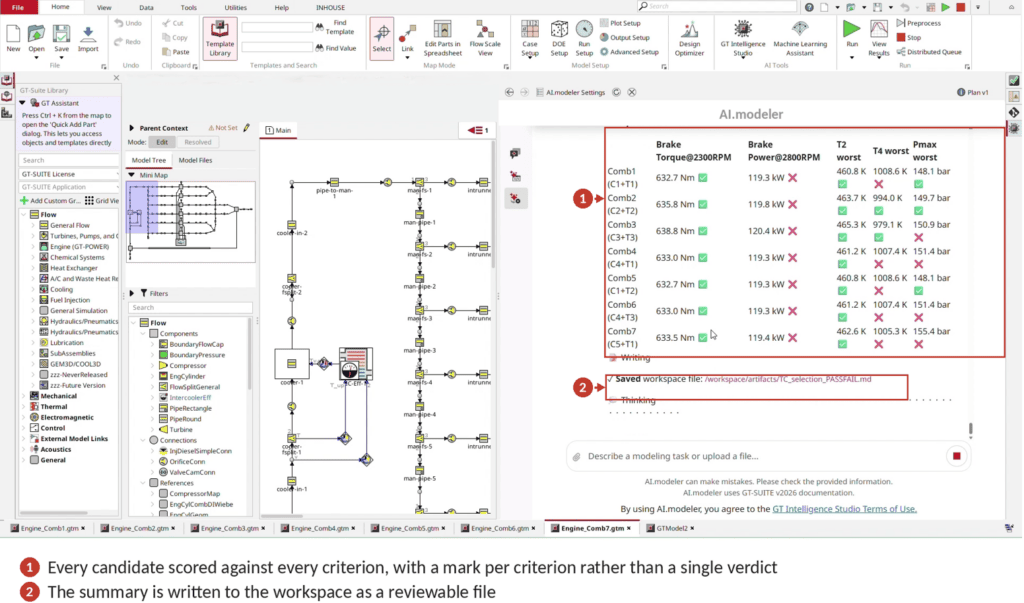
Step 6: Solve and evaluate. The validated variants are solved in sequence. Each candidate is then scored against every criterion in the set, with performance targets evaluated at their specified operating points and hardware limits evaluated at the worst case across the operating range. Pass and fail are recorded per criterion rather than collapsed into a single verdict.
Phase 3: Post-processing and reporting
Step 7: Update the post-processing script. The Skill points the post-processing configuration at the correct result directories, maps result filenames back to their candidate labels, and assigns distinguishable colours and markers per candidate. The filename-to-label mapping is the quiet failure mode in manual work: a mislabelled series inverts a conclusion while leaving every plot looking plausible.
Step 8: Verify the result variables. Before any plot is built, the Skill confirms that every result variable the criteria depend on is actually present in the result files. A variable that is missing is reported as missing rather than omitted from the report, so the engineer is never shown a comparison that is quietly incomplete.
Step 9: Save and hand over. The comparison report and the pass/fail summary are written to the workspace as reviewable artefacts, and the Skill tells the engineer how to open and run them. The output is a file the engineer can inspect, share, and re-run, not a transcript that has to be read back.
Two properties of this decomposition matter more than the individual steps.
The first is that gaps are surfaced rather than absorbed. A missing map object, an absent result variable, or a variant that fails validation is reported at the point of detection instead of propagating silently into a report that appears complete. The second is that the marginal cost of an additional candidate collapses. Performed by hand, screening effort scales roughly in proportion to the number of candidates, which in practice caps how many candidates a program is willing to consider. Executed as a Skill, the procedure is defined once and the cost of extending the study is largely solver time, which makes broader screening practical rather than merely desirable.
Productivity and Return on Investment (ROI)
In a multi-candidate turbocharger selection study, the effort required fell from an estimated 40 hours of manual work to approximately 4 hours. The reduction comes from removing repeated variant construction and manual cross-checking. The engineering content of the assessment, the maps, the criteria, and the underlying GT-POWER solution, is unchanged.
The time saving is the most visible return, but it is not the only one, and arguably not the most durable. Three effects compound with it:
• Process standardization. The same steps run in the same order on every program, so results from different engineers and different quarters are directly comparable.
• Reduced exposure to manual error. Configuration and bookkeeping steps that are easy to get subtly wrong are executed mechanically, and the ones that cannot be verified are reported rather than assumed.
• Retention of domain knowledge. Procedures refined over years of programs are held in the platform rather than in the working memory of the few engineers who have performed them most recently.
The methodology is general. It applies to any number of candidates and any criteria set the engineer defines; the study above is one illustration of it.
The Role of Skill-Based Automation in Engineering Workflows
The significance of encoding a procedure of this kind is not that a study runs faster, though it does. It is that a documented procedure becomes an executed procedure, invariant across engineers, programs, and iterations, with its assumptions and its gaps stated rather than inferred. Expertise held by a handful of specialists and reapplied by hand on each new program becomes a workflow available to every engineer at every design iteration. For Turbocharger selection specifically, that shifts the study from something performed once, when a program demands it, to a check that can be repeated whenever the candidate set or the criteria change, which is how a matching decision gets made on evidence rather than on the first candidate that clears the bar.
Contact us to see a Skill of this kind executed on your own baseline engine model. Visit the GT Intelligence Studio product page to learn more about AI.modeler, AI.advisor, and AI.coder.
Follow GT on LinkedIn for the latest updates on AI capabilities and simulation-driven engineering workflows. Subscribe to the GT blog to receive updates on new AI capabilities, engineering solutions, and industry trends.
Frequently Asked Questions
What is an AI.modeler Skill?
A Skill in AI.modeler, part of GT Intelligence Studio, is a structured engineering workflow that runs against the engineer’s own GT-SUITE model. It specifies the sequence of steps, the checks at each step, and the points where the engineer is consulted, and AI.modeler executes them in that order.
What are the most common errors in manual turbocharger matching?
Four common errors are skipping the import of a missing map, setting a speed limit incorrectly, configuring cases and cycles inconsistently between variants, and mapping a result filename to the wrong candidate label. The last one can invert a conclusion while the plots still look reasonable.
How many candidate combinations can be screened in a single study?
The number is not fixed by the Skill. The combination table defines the candidate set, and the Skill builds, configures, solves, and assesses one variant per entry. Because the procedure is specified once and applied uniformly, adding candidates increases solver time rather than engineering effort, which is what makes larger candidate sets practical to evaluate at all.
Which evaluation criteria can be applied, and can they change between studies?
The criteria are supplied by the engineer as part of the study definition rather than built into the Skill, so both the criteria and their limits can change from one program to the next. Each limit is parsed into a comparison direction and an evaluation point, and before generating a report the Skill confirms that the result variables needed to test it exist in the output files.
Does the engineer stay in control of what gets run?
Yes. Two of the ten steps exist for that purpose. Step 0 confirms the parsed study before any model is written, and Step 5 requires explicit authorization before any solver is launched. Estimates and substitutions are labelled where they are made, so the engineer checks the setup rather than having to trust it.